Pixels and Resolution Explained: What 1080p vs 4K Actually Means
A pixel is the smallest individually controllable dot of light on a digital display, and resolution is simply the count of pixels arranged across the screen's width and height — 4K packs four times as many total pixels into the same screen area as 1080p, since both dimensions double.
Reading time
— 5 min
Updated
— Sep 24, 2026
Fact-reviewed
— Aug 28, 2026
Key Takeaways
Key Takeaways
1A pixel is a single controllable dot of light, and resolution is just how many of those dots are arranged across a screen's width and height.
24K has exactly four times as many total pixels as 1080p — not twice — because doubling both width and height (2x each) multiplies total area by 2x2.
3Resolution alone doesn't determine sharpness — pixel density (PPI), which also accounts for physical screen size, is what actually determines how sharp an image looks to the eye at a given viewing distance.
The concept
Imagine a screen as a giant mosaic made of tiny colored tiles. Each tile is a pixel, and it can be lit up in millions of different colors by mixing red, green, and blue light. Resolution is simply how many tiles are laid out across the width and the height of the mosaic — a "1920x1080" screen has 1,920 tiles across and 1,080 tiles down. More tiles in the same physical space means each individual tile is smaller, which makes the whole picture look smoother and more detailed up close.
The "doubling each dimension quadruples the total" math is the single most common source of confusion around resolution names, and it's worth running the actual numbers rather than trusting intuition here.
Quick check
If 1080p resolution is 1920x1080 and 4K resolution is 3840x2160 (exactly double each dimension), how many times more total pixels does 4K have compared to 1080p?
Worked examples
Example 1: Comparing 1080p and 4K on the same size screen (baseline case)
Take two otherwise identical 55-inch televisions, one 1080p and one 4K. The 4K screen packs roughly four times as many pixels into the exact same physical area, meaning each individual pixel is about half the width and half the height of a 1080p pixel. At a typical living-room viewing distance, this higher pixel density can make fine detail — text, distant objects, intricate textures — look noticeably crisper, especially the closer the viewer sits, since smaller pixels become individually distinguishable to the eye at a shorter distance.
Quick check
On identical 55-inch televisions, one 1080p and one 4K, the 4K screen looks noticeably crisper up close. What is the direct cause?
Example 2: The same resolution on very different screen sizes (edge case / variation)
A 4K resolution image looks dramatically sharper on a 6-inch smartphone screen than the identical 4K resolution does on an 85-inch television, even though the pixel count is exactly the same in both cases. This is because PPI accounts for physical size as well as pixel count — cramming 8.3 million pixels into a small phone screen produces an extremely high PPI (often 400-800+), while spreading that same 8.3 million pixels across an 85-inch television produces a much lower PPI, simply because each pixel now has to cover far more physical area. Resolution alone, without accounting for screen size, is an incomplete way to judge how sharp an image will actually look.
Quick check
A 4K smartphone screen and a 4K television have identical resolution (3840x2160), but the smartphone image looks far sharper up close. Why?
Example 3: Choosing a monitor resolution for close-up desk work (real-world / applied case)
Someone shopping for a monitor to sit roughly two feet from their eyes for reading text and detailed work should weigh PPI, not just headline resolution — a 27-inch 4K monitor has meaningfully higher PPI (and sharper text) than a 32-inch monitor at the same 4K resolution, since the larger screen spreads the identical pixel count over more physical area. A very large screen at a relatively low resolution can look noticeably "grainy" up close even though the same panel would look perfectly sharp viewed from across a room, precisely because perceived sharpness depends on how large each individual pixel appears relative to the viewer's distance from it.
Quick check
A 27-inch and a 32-inch monitor both have 4K resolution. For close-up desk work like reading text, which one will generally look sharper, and why?
How it works (visual)
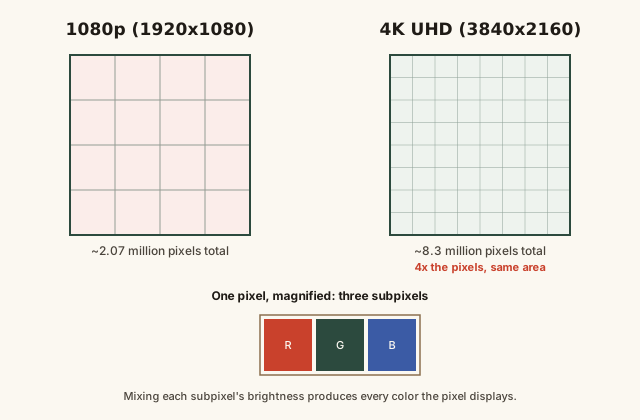
1080p vs 4K pixel grids, and one pixel's red/green/blue subpixels
Notice the 4K grid isn't just "a bit finer" — every pixel from the 1080p grid is effectively replaced by four smaller pixels in the same space, which is exactly where the 4x total pixel count comes from.
Common mistakes
Common Mistakes
✕
Assuming 4K is exactly twice as sharp or twice the resolution of 1080p.
→ 4K doubles both the width and height compared to 1080p, which multiplies total pixel count by four, not two — '4K' refers loosely to the roughly 4,000-pixel horizontal count, not a '4x some 1080p unit' multiplier.
✕
Judging sharpness from resolution alone, ignoring screen size.
→ Use PPI (pixels per inch) to compare sharpness fairly across different screen sizes — the same resolution looks dramatically different on a phone versus a television.
✕
Expecting upscaled lower-resolution content to look as sharp as native content of the display's resolution.
→ Upscaling stretches existing pixel information to fill more physical pixels — it can look reasonably good with strong processing, but it isn't the same as content that was actually captured at the display's full resolution.
Common misconception
“A higher-resolution screen always looks sharper, regardless of its physical size or how far away you're sitting.”
Perceived sharpness depends on pixel density (PPI) at a given viewing distance, not resolution alone. An enormous 4K television viewed from across a large room can look just as sharp — sometimes sharper in practical terms — as the identical resolution stretched across a much bigger screen and viewed from close up, because the eye's ability to distinguish individual pixels depends on how large each pixel appears from where you're sitting, not just how many pixels exist in total.
Try it yourself
Calculate pixel density (PPI)
Enter a screen's resolution and diagonal size to see its pixel density — a more reliable sharpness comparison than resolution alone.
Pixel density (PPI)163.18
What to do next
What to do next
When comparing screens, check PPI rather than raw resolution alone, especially when the screens are different physical sizes.
For close-up work (monitors, phones), prioritize higher PPI; for screens viewed from a distance (living-room TVs), moderate PPI is often plenty.
Don't expect upscaled lower-resolution content to look identical to native content at the display's full resolution.
Remember '4K' means roughly four times the pixels of 1080p, not twice — useful for setting realistic expectations about the visible difference.
FAQ
FAQ
Related terms
Related terms
Pixel
The smallest individually controllable unit of a digital display, short for 'picture element,' typically made of red, green, and blue subpixels.
Resolution
The number of pixels arranged across a display's width and height, usually written as width x height (e.g. 1920x1080).
Subpixel
One of the three (or sometimes more) colored light elements — typically red, green, and blue — that combine within a single pixel to produce its perceived color.
PPI
Pixels per inch — a measure of pixel density that accounts for both resolution and physical screen size, used to judge how sharp an image will actually look.
1080p
A common shorthand for Full HD resolution, 1920x1080 pixels, roughly 2.07 million pixels total.
4K UHD
A common shorthand for Ultra HD resolution, 3840x2160 pixels, roughly 8.3 million pixels total — exactly four times the pixel count of 1080p.
Upscaling
A process where a display or device artificially generates extra pixel detail to stretch lower-resolution source content to fill a higher-resolution screen, without adding genuine additional detail.
This entry was researched from public sources and drafted with AI-assisted tools, then edited — errors are still possible. Spot one, or want a topic covered? Read our disclaimer.
 KnowThis