A modern touchscreen is a projected-capacitive sensor — a grid of transparent electrodes that detects a finger's natural electrical charge distorting the local electric field, rather than detecting physical pressure the way an older resistive touchscreen did.
Reading time
— 5 min
Updated
— Sep 24, 2026
Fact-reviewed
— Aug 28, 2026
Key Takeaways
Key Takeaways
1Most modern touchscreens don't measure pressure at all — they detect the natural electrical charge your finger carries, which disturbs an invisible electric field grid built into the screen.
2This is exactly why capacitive touchscreens usually don't respond to a gloved finger or a plain plastic stylus tip — neither one conducts electrical charge the way skin does.
3The screen doesn't 'see' a touch directly; a controller chip measures which grid intersections lost capacitance and calculates an X/Y coordinate from the pattern.
The concept
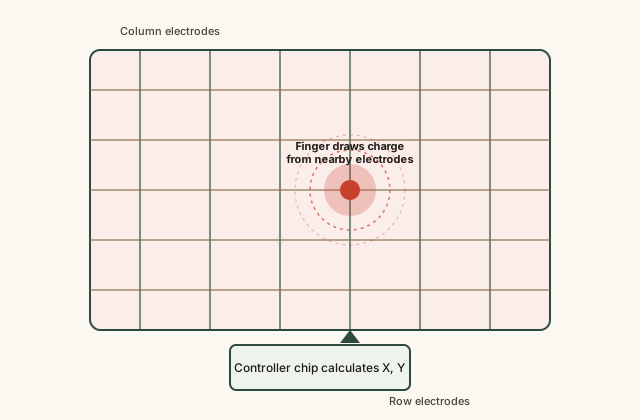
Imagine a screen with an invisible, extremely fine wire grid running through it, each wire carrying a tiny electric charge. Your finger is naturally slightly conductive — it's mostly water with dissolved salts — so when it gets close to that grid, it siphons off a tiny bit of the charge at that exact spot. A chip inside the phone is constantly checking the whole grid, notices exactly where the charge dropped, and translates that location into the X and Y position of your tap. This is a capacitive touchscreen, and it's the type used on the overwhelming majority of modern smartphones and tablets.
This electrical-charge mechanism, rather than a pressure mechanism, explains a whole category of everyday touchscreen quirks — and the worked examples below walk through the most common ones with the actual physics behind each.
Quick check
Why does a capacitive touchscreen usually fail to respond to a finger wearing a thick winter glove, even when the person presses firmly?
Worked examples
Example 1: A single finger tap (baseline case)
A bare finger touches the screen. The finger's natural conductivity draws a small, measurable amount of charge from the nearest grid intersections. The controller chip, scanning the grid continuously, detects a localized capacitance drop spanning several neighboring intersections, calculates the weighted center of that disturbance, and reports a precise X/Y coordinate to the operating system — all within a few milliseconds, which is why the response feels instantaneous.
Quick check
A single bare-finger tap on a capacitive touchscreen is registered as one precise X/Y coordinate. What lets the controller pinpoint the location so precisely, given the grid's electrodes are spaced much further apart than the precision achieved?
Example 2: Using a stylus, and why some styluses don't work (edge case / variation)
A plain plastic or wooden stylus generally fails to register on a capacitive touchscreen, because plastic and wood are electrical insulators — they carry no charge to draw from the grid. A stylus designed for capacitive screens instead has a soft conductive tip (often a special rubber or foam compound infused with conductive material) that mimics a finger's electrical behavior closely enough for the grid to register it, without needing the more complex electronics of a true digital pen. High-precision digital pens (the kind that can detect pressure and tilt) go a step further, using active electronics inside the pen itself that communicate directly with the screen's controller — a genuinely different, more capable technology layered on top of the same capacitive grid.
Quick check
Why does a plain wooden pencil generally fail to work as a stylus on a capacitive touchscreen, while a finger works fine?
Example 3: Wet-screen and accidental-touch problems (real-world / applied case)
Water is somewhat conductive (especially with dissolved minerals, as in sweat or tap water), which is why a wet screen can register phantom touches or become unresponsive to real ones — droplets of water can mimic or interfere with the same charge-disturbance pattern a finger produces, confusing the controller about where the real touch is. This is also the underlying reason many phones use a small proximity or capacitive-adjacent sensor near the earpiece to disable the touchscreen automatically during a phone call — pressing a cheek against the glass would otherwise register as a series of unwanted touch events.
Quick check
Why can water droplets on a capacitive touchscreen cause phantom (unintended) touches?
How it works (visual)
A capacitive touchscreen's electrode grid detecting a finger touch
The controller doesn't need to guess which single wire was touched — because a real finger disturbs several neighboring intersections at once, it can interpolate a touch location far more precise than the physical spacing of the grid lines themselves.
Common mistakes
Common Mistakes
✕
Assuming a touchscreen detects pressure, the same way pressing a physical button does.
→ A modern capacitive touchscreen detects electrical charge disturbance, not force — pressing much harder with a bare finger doesn't make it more responsive, and pressing lightly with bare skin works fine.
✕
Believing any stylus or pointed object should work on any touchscreen.
→ Only conductive tips work reliably on capacitive screens; check whether a stylus is specifically labeled for capacitive touchscreens before assuming it will register.
✕
Thinking a wet or dirty screen is 'broken' when it misbehaves.
→ Water and some liquids conduct electricity well enough to create false touch signals or block real ones — drying the screen thoroughly often resolves the issue without any hardware fault involved.
Common misconception
“Touchscreens work by sensing physical pressure from your finger, the same basic idea as a mechanical button.”
Most modern touchscreens are capacitive and detect electrical charge disturbance, not pressure — this is precisely why they generally don't respond to gloves, plastic styluses, or a dead (uncharged) object no matter how hard it presses, while a very light bare-finger touch registers instantly. Older resistive touchscreens genuinely did detect pressure by physically pressing two conductive layers together, but that technology has been largely replaced on consumer devices because it's less precise and can't smoothly support multi-touch gestures.
What to do next
What to do next
If a touchscreen won't respond to a gloved hand, look specifically for gloves labeled 'touchscreen-compatible' — they weave conductive thread into the fingertips.
If a stylus stops registering, check whether its tip is a conductive rubber/foam type rather than plain plastic or wood.
If a screen misbehaves after exposure to water, dry it thoroughly (including around the edges and any ports) before assuming it's a hardware fault.
Remember that a screen protector can slightly reduce sensitivity by adding distance between your finger and the electrode grid — genuine capacitive-compatible protectors are designed to minimize this.
FAQ
FAQ
Related terms
Related terms
Capacitive touchscreen
A touchscreen that detects touch by sensing disturbances in an electric field created by a grid of transparent electrodes, typically triggered by the natural electrical charge in a human finger.
Resistive touchscreen
An older touchscreen type made of two flexible conductive layers that register a touch when physical pressure presses them together, working with any object including a gloved finger.
Electrode
A thin conductive line or panel — in a touchscreen, an ultra-thin, transparent conductive material arranged in a grid across the display.
Capacitance
A measure of how much electrical charge a surface can hold; a touchscreen controller detects touch by measuring small local changes in capacitance.
Indium tin oxide (ITO)
A transparent, electrically conductive material commonly used to form the invisible electrode grid inside capacitive touchscreens.
Multi-touch
The ability of a touchscreen to detect and track more than one simultaneous touch point, made possible by scanning the full electrode grid rather than a single circuit.
This entry was researched from public sources and drafted with AI-assisted tools, then edited — errors are still possible. Spot one, or want a topic covered? Read our disclaimer.
 KnowThis