How Bluetooth Works: Short-Range Wireless Explained
Bluetooth is a short-range wireless radio standard that transmits data over the crowded 2.4GHz radio band by rapidly and continuously hopping between dozens of channels, which is how two paired devices maintain a reliable connection despite sharing that airspace with WiFi and countless other devices.
Reading time
— 5 min
Updated
— Sep 24, 2026
Fact-reviewed
— Aug 28, 2026
Key Takeaways
Key Takeaways
1Bluetooth doesn't use one fixed radio channel — paired devices continuously hop between dozens of channels roughly 1,600 times per second, following a pattern known only to that pair.
2This frequency-hopping is specifically what lets Bluetooth coexist with WiFi and countless other devices sharing the same crowded 2.4GHz radio band without constant interference problems.
3Bluetooth range is deliberately short (commonly around 10 meters for everyday accessories) because it's designed as a personal-area, low-power standard, not a replacement for WiFi's longer-range networking.
The concept
Picture two people trying to talk privately using walkie-talkies in a room full of other walkie-talkie conversations happening on the same channel. If they stayed on one channel, they'd constantly hear static and interruptions from everyone else. Instead, imagine they both had a secret, pre-agreed pattern of channels to jump between every fraction of a second — channel 12, then channel 45, then channel 3, and so on — always switching together in sync. Anyone else's chatter on any single channel only ever interrupts them for a tiny fraction of a moment before they've already moved on. That's essentially how Bluetooth avoids interference on a crowded radio band.
That constant hopping is also directly responsible for Bluetooth's characteristic short range and modest data rate compared to WiFi — the design trade-offs below explain exactly why, with real numbers.
Quick check
Two Bluetooth earbuds keep connecting reliably to a phone even in a room full of WiFi routers and other 2.4GHz devices. What is the main reason this works?
Worked examples
Example 1: Pairing wireless earbuds with a phone (baseline case)
Pairing wireless earbuds with a phone establishes a shared secret and a shared hopping pattern between the two devices — from that point on, whenever they're both nearby and Bluetooth-enabled, they can reconnect automatically without repeating the full pairing process, since the phone recognizes the earbuds' saved identity. Once connected, both devices hop together through their agreed channel sequence roughly 1,600 times per second, streaming audio data in small packets that get reassembled into continuous sound on the earbud side, fast enough that the hopping itself is completely imperceptible to the listener.
Quick check
After pairing wireless earbuds with a phone once, why can they reconnect automatically the next day without the user repeating the pairing process?
Example 2: A crowded room with many Bluetooth devices at once (edge case / variation)
In a room with dozens of active Bluetooth devices — a common scenario at a busy office or conference — each pair of connected devices is still hopping through the same shared 2.4GHz band, just with different, independently-agreed hopping sequences. The band isn't infinite, so as the number of simultaneously active Bluetooth connections and WiFi networks in the same physical space climbs, collisions (two devices trying to use the same channel at the same instant) do become statistically more frequent, which is the real, physical reason audio can occasionally stutter or connections can feel less reliable in very crowded wireless environments — it isn't a flaw exclusive to any one device, it's genuine radio-spectrum congestion.
Quick check
Why might Bluetooth headphones stutter more often in a crowded conference hall with hundreds of active wireless devices, compared to at home?
Example 3: Choosing Bluetooth vs WiFi for a task (real-world / applied case)
Someone deciding how to connect a wireless keyboard to a computer would typically reach for Bluetooth rather than WiFi, since Bluetooth is specifically engineered for short-range, low-power, low-to-moderate data-rate connections between nearby personal devices — exactly the profile of a keyboard's needs. Someone streaming a 4K video from a laptop to a smart TV across a room, however, needs far more sustained bandwidth than Bluetooth is designed to provide, which is why that kind of task relies on WiFi instead, or a dedicated wireless display protocol built on top of it. The right choice comes down to matching the technology's actual design trade-offs (range, power use, data rate) to the specific task, not just picking whichever wireless option happens to be available.
Quick check
Why is Bluetooth a better fit than WiFi for connecting a wireless keyboard to a computer?
How it works (visual)
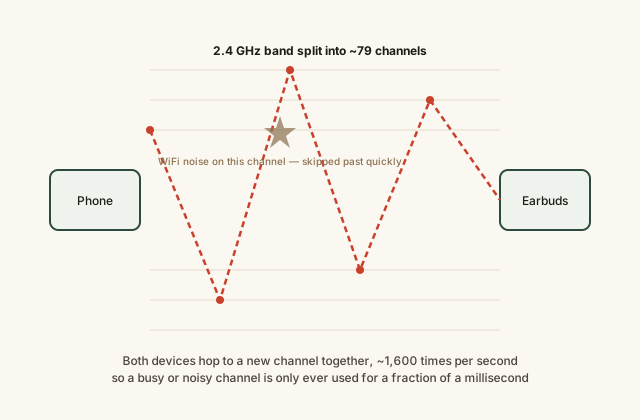
Two Bluetooth devices frequency-hopping across the 2.4GHz band
Because both devices always hop together, in sync, an outside device on the same band never knows in advance which channel this particular conversation will use next — which also happens to make casual eavesdropping considerably harder.
Common mistakes
Common Mistakes
✕
Assuming Bluetooth and WiFi use completely separate, non-overlapping radio frequencies.
→ Classic Bluetooth and 2.4GHz WiFi share the same unlicensed radio band; Bluetooth's frequency-hopping is specifically designed to tolerate that shared, busy airspace.
✕
Thinking Bluetooth range problems mean a device is broken.
→ Bluetooth is intentionally short-range and low-power by design (commonly around 10 meters for everyday accessories) — walking further away or adding obstacles between devices can degrade the connection even with fully functional hardware.
✕
Expecting Bluetooth to handle the same sustained high-bandwidth tasks WiFi handles, like streaming very large files quickly.
→ Bluetooth is optimized for short-range, low-to-moderate data rate, low-power connections; large sustained transfers are better suited to WiFi.
Common misconception
“Bluetooth devices interfere badly with WiFi (or vice versa) whenever both are active nearby, because they're incompatible technologies.”
Bluetooth and WiFi were specifically engineered to coexist on the shared 2.4GHz band — Bluetooth's frequency-hopping is one of the core mechanisms that allows this coexistence, since any single WiFi transmission only ever blocks a brief hop, not the whole connection. Some mutual interference is genuinely possible, especially in radio-congested environments with many devices, but well-implemented Bluetooth and WiFi hardware in the same room generally coexist without major problems for typical everyday use.
Try it yourself
Convert Bluetooth data rate to a file-friendly unit
Bluetooth throughput is often quoted in megabits per second (Mbps); file sizes are usually measured in megabytes (MB). Convert between them.
Equivalent data rate (MB/s)0.25
What to do next
What to do next
If Bluetooth audio stutters in a crowded space, expect it to improve in a less radio-congested environment rather than assuming a device fault.
Keep Bluetooth-connected devices reasonably close and free of major physical obstructions for the most reliable connection.
Choose Bluetooth for short-range, low-power personal-device connections, and WiFi for sustained, higher-bandwidth tasks.
If a Bluetooth device won't reconnect, try re-pairing it — this refreshes the shared connection information both devices rely on.
FAQ
FAQ
Related terms
Related terms
Bluetooth SIG
The Bluetooth Special Interest Group, the industry organization that owns, develops, and licenses the Bluetooth wireless standard.
2.4 GHz ISM band
A globally unlicensed radio frequency band available for industrial, scientific, and medical use, shared by Bluetooth, WiFi, and many other everyday wireless devices.
Frequency-hopping spread spectrum (FHSS)
A radio technique where two communicating devices rapidly and continuously switch which frequency channel they use, in a pattern known to both, to avoid interference and reduce the chance of signal collision.
Pairing
The process by which two Bluetooth devices exchange identifying information and agree to trust each other for future connections, typically done once per device pair.
Bluetooth Low Energy (BLE)
A power-efficient variant of the Bluetooth standard designed for devices that need to run for long periods on small batteries, such as fitness trackers and wireless sensors.
Piconet
A small local network formed by one Bluetooth device acting as the coordinator and up to several other devices connected to it.
This entry was researched from public sources and drafted with AI-assisted tools, then edited — errors are still possible. Spot one, or want a topic covered? Read our disclaimer.
 KnowThis