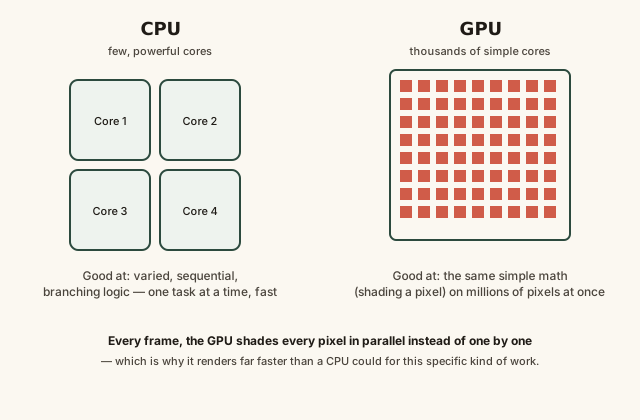
A GPU (graphics processing unit) is a specialized chip built with thousands of small, simple cores designed to perform the same calculation on massive amounts of data simultaneously — the exact shape of work involved in rendering pixels for a screen, which is very different from the complex, sequential work a CPU is built to handle.
Reading time
— 5 min
Updated
— Sep 24, 2026
Fact-reviewed
— Aug 28, 2026
Key Takeaways
Key Takeaways
1A GPU trades a CPU's handful of powerful, flexible cores for thousands of small, simple cores — a design built specifically for doing the same math on huge amounts of data at once.
2Rendering a screen is exactly that kind of task: shading millions of pixels every frame is repetitive, independent work that's ideal for massive parallel processing rather than fast sequential processing.
3Because GPUs excel at doing many identical calculations in parallel, the same hardware turns out to be excellent at non-graphics workloads with the same shape, like machine learning and scientific simulation.
The concept
Imagine a kitchen with a handful of expert chefs who can each cook an entire complex dish start to finish, versus a kitchen with a thousand line cooks who can each only do one simple repetitive task — chopping one type of vegetable, say — but can all do it at the exact same time. The CPU is the small team of expert chefs: flexible, capable of handling any complicated, varied task, but limited in how many things they can do simultaneously. The GPU is the thousand line cooks: each one individually much simpler than a chef, but together able to process an enormous pile of identical, simple tasks — like calculating the color of every pixel on your screen — far faster than the small expert team ever could.
This same "many identical calculations at once" shape is exactly why the practical examples below range from smooth gameplay to, less obviously, machine learning — both are really the same underlying computational pattern.
Quick check
Why is a GPU generally far better than a CPU at rendering a 3D video game scene, even though a modern CPU has a much higher clock speed per core?
Worked examples
Example 1: Rendering one frame of a video game (baseline case)
To render a single frame, the GPU processes the 3D scene's geometry, converts it into a 2D grid of pixels, then shades every one of those pixels — determining its color based on lighting, textures, and camera angle. On a screen with roughly 2 million pixels (1080p), that's roughly 2 million largely independent shading calculations needed for just one frame, and a smooth 60 frames-per-second experience means repeating that entire process 60 times every second. Spreading millions of independent calculations across thousands of GPU cores working simultaneously is what makes finishing that workload in a fraction of a second physically feasible; the same total math run through a CPU's handful of cores, one batch at a time, would take dramatically longer.
Quick check
Rendering one frame of a game at 1080p requires shading roughly 2 million pixels. Why is a GPU able to finish this within a tiny fraction of a second, while a CPU working through the same math would take dramatically longer?
Example 2: Frame rate vs. frame time under a heavier scene (edge case / variation)
A game running at a steady 60 frames per second gives the GPU roughly 16.7 milliseconds to fully render each frame before the next one is due. Switch to a visually heavier scene — more objects, more complex lighting — and if the GPU can no longer finish all of that shading work within the time budget, the frame rate drops rather than the visuals becoming incomplete; a drop to 30 FPS means the GPU now has roughly 33.3 milliseconds per frame, twice as much time, which is often exactly enough to finish the heavier scene's work, just at half the previous smoothness. This is the direct, mechanical relationship between frame rate and frame time: they're reciprocals of each other, not two independent settings.
Quick check
A game's frame rate drops from 60 FPS to 30 FPS when entering a visually complex area. What does this tell you about the GPU's available time budget per frame?
Example 3: Why GPUs are also used for machine learning (real-world / applied case)
Training a machine learning model involves performing the same type of mathematical operation (mostly matrix multiplication) on enormous amounts of data, repeated over and over — a computational shape that looks structurally identical to shading millions of independent pixels, just applied to numbers representing a dataset instead of a scene. This is precisely why GPUs, originally built for graphics, turned out to be extremely well-suited to machine learning workloads once developers found ways to route that kind of math through the same massively parallel cores — a graphics chip's core design strength (many identical simple calculations at once) transfers directly to any workload with that same underlying shape, graphics or not.
Quick check
Why are GPUs, originally built for rendering graphics, also widely used for training machine learning models?
How it works (visual)
CPU's few complex cores vs. a GPU's thousands of simple parallel cores
Every small square in the GPU's grid can be working on a different pixel's shading calculation at the exact same instant — that simultaneity, not raw per-core speed, is the entire source of a GPU's rendering advantage.
Common mistakes
Common Mistakes
✕
Assuming a GPU is simply 'a faster CPU' rather than a differently-shaped processor.
→ A GPU trades per-core flexibility and speed for a massive number of simple cores — it excels at parallel, repetitive workloads and isn't generally a good substitute for a CPU's varied, sequential general-purpose tasks.
✕
Judging graphics performance by GPU core count alone, ignoring VRAM and other factors.
→ Core count matters, but dedicated VRAM capacity and speed, along with the rest of the rendering pipeline, all affect real-world graphics performance together.
✕
Thinking a dropped frame rate always means broken hardware.
→ A frame rate drop under a heavier rendering load usually reflects the GPU running out of its per-frame time budget for that scene's complexity — a normal computational limit, not necessarily a fault.
Common misconception
“A graphics card is only useful for gaming and visual applications.”
A GPU's real specialty is massively parallel computation — performing the same simple calculation across huge amounts of data simultaneously — and rendering pixels is just one workload with that shape. Machine learning model training, scientific simulations, and various data-processing tasks share the same fundamental computational pattern, which is why GPUs are widely used well outside of graphics and gaming despite the name.
Try it yourself
Calculate frame time from frame rate
See how much time a GPU actually has to render each frame at a given frame rate.
Time budget per frame (milliseconds)16.67
What to do next
What to do next
When comparing graphics cards, look beyond core count alone — VRAM capacity and overall rendering pipeline performance both matter for real-world results.
If a game's frame rate drops in complex scenes, recognize this as the GPU running out of its per-frame time budget, not necessarily a hardware problem.
Remember frame time and frame rate are reciprocals — halving the frame rate roughly doubles the time budget the GPU has per frame.
If a task involves the same repetitive calculation across huge amounts of data (not just graphics), consider whether GPU-based processing could apply.
FAQ
FAQ
Related terms
Related terms
GPU
Graphics processing unit — a specialized processor built with thousands of small, simple cores designed for performing the same calculation across massive amounts of data in parallel.
Parallel processing
Performing many calculations at the same time (simultaneously) rather than one after another, which is what a GPU's many cores are specifically built to do.
Shading
The process of calculating the final color, brightness, and lighting of an individual pixel — one of the core repetitive tasks a GPU performs for every pixel in a rendered frame.
Frame rate
The number of complete images (frames) a display or GPU produces per second, commonly measured in FPS (frames per second).
Frame time
The amount of time available to render a single frame at a given frame rate — a higher frame rate means less time is available per frame.
VRAM
Video RAM — memory built directly onto a graphics card, dedicated to holding the textures, frame buffers, and other graphics data the GPU needs immediate access to.
Rendering pipeline
The sequence of processing stages — including vertex processing, rasterization, and pixel shading — a GPU runs through to turn 3D scene data into a final 2D image on screen.
This entry was researched from public sources and drafted with AI-assisted tools, then edited — errors are still possible. Spot one, or want a topic covered? Read our disclaimer.
 KnowThis