What Makes a Laptop Different From a Desktop, Technically
A laptop and a desktop use fundamentally the same categories of components, but a laptop's cramped case, shared cooling, and reliance on a battery force every component to be tuned to a far lower power ceiling than a desktop's roomier case and constant wall power allow.
Reading time
— 5 min
Updated
— Sep 24, 2026
Fact-reviewed
— Aug 28, 2026
Key Takeaways
Key Takeaways
1A laptop and a desktop use the same basic categories of components — CPU, RAM, storage, GPU — the real difference is the power ceiling each one is engineered to operate within.
2A laptop's cramped case, shared cooling, and dependence on a battery force its components to run at a much lower sustained power draw than a desktop's equivalent parts, which is the direct cause of most performance gaps between the two.
3Desktops trade portability and battery life for modular, upgradeable components and effectively unlimited cooling and power, which is why the same-priced desktop generally outperforms the same-priced laptop.
The concept
Think of the difference between a compact city car and a full-size truck. Both have an engine, wheels, and a fuel tank — the same basic categories of parts — but the car's parts are tuned for fitting into a small, light frame and sipping fuel efficiently, while the truck's parts are tuned for raw power with much less concern for size or fuel economy. A laptop and a desktop are similar: same categories of components (CPU, RAM, storage, graphics), but the laptop's version of each is deliberately tuned to run within a much smaller power and heat budget so it can survive on battery power in a thin, portable case.
This power-ceiling framing explains a lot of everyday laptop-vs-desktop observations that otherwise seem arbitrary — including why upgrading a laptop is so much harder than upgrading a desktop, worked through concretely below.
Quick check
A laptop and a desktop advertise CPUs from the same product generation and similar core counts, but the desktop noticeably outperforms the laptop under sustained heavy workloads. What's the most likely reason?
Worked examples
Example 1: Comparing similarly-priced laptop and desktop specs (baseline case)
Two computers at roughly the same price point — one a laptop, one a desktop — will typically show the desktop offering noticeably higher raw performance specs (faster CPU, more powerful GPU, more storage) for the same money. This isn't a pricing quirk; the desktop's manufacturer doesn't have to pay for a battery, a built-in screen and keyboard, or the engineering effort of miniaturizing everything into a thin, well-cooled, power-efficient package — all of that cost and engineering complexity in a laptop goes toward portability rather than raw computing power.
Quick check
Two computers cost the same, but the desktop has noticeably higher-spec components than the laptop. What is the most accurate reason for this gap?
Example 2: Upgrading RAM or storage later (edge case / variation)
Many desktops allow straightforward RAM and storage upgrades years after purchase, since those components are typically modular — plugged into standard sockets or slots that are easy to access and swap. Many laptops, especially thinner ultra-portable models, increasingly solder RAM (and sometimes storage) directly to the board specifically to save the internal space and clearance that removable sockets require, which means the laptop's RAM and storage configuration at the time of purchase may be effectively permanent. This is a direct consequence of the same space-and-heat-constrained design philosophy, not an arbitrary manufacturer restriction.
Quick check
Why is it common for a thin, ultra-portable laptop to have RAM that can't be upgraded after purchase, while many desktops allow easy RAM upgrades?
Example 3: Choosing between a laptop and desktop for sustained heavy work (real-world / applied case)
Someone doing long, sustained heavy computing tasks — video editing exports, large data processing jobs, or gaming for hours at a time — while staying in one place most of the day, is generally better served by a desktop: it can sustain higher performance for longer without thermal throttling, cools more effectively, and often costs less for equivalent raw performance. Someone whose work genuinely requires moving between locations — traveling for work, attending classes, working from different rooms — needs the portability a laptop provides, even knowing it involves accepting a lower sustained performance ceiling and less upgrade flexibility as the trade-off for that mobility.
Quick check
Someone does long, sustained video editing exports every day but always works from the same desk. Based purely on the technical trade-offs, which is generally the better fit?
How it works (visual)
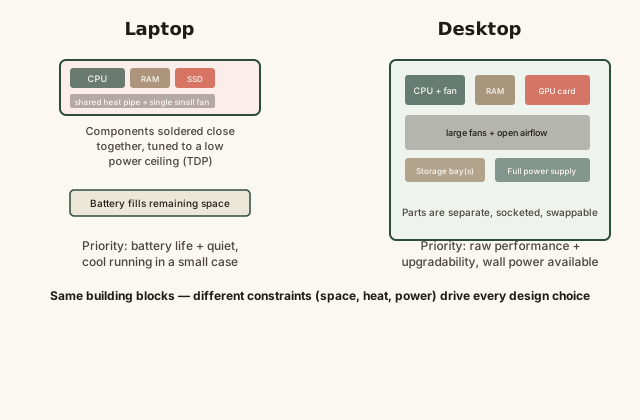
Laptop vs desktop: same component categories, different space and power constraints
Every constraint visible in the laptop's cross-section — shared airflow, tight component spacing, battery space — traces back to the same root requirement: it has to work unplugged, in a shape that fits in a bag.
Common mistakes
Common Mistakes
✕
Assuming a laptop and desktop with similarly-named components will perform identically.
→ Laptop-class versions of a component are commonly tuned to a lower power ceiling (TDP) than their desktop counterparts, even when the model name looks similar — check for laptop-specific reviews and benchmarks rather than assuming desktop specs apply.
✕
Expecting every laptop to be upgradeable the way most desktops are.
→ Check a specific laptop model's documented upgrade options before purchase — many, especially thinner models, solder RAM and sometimes storage directly to the board.
✕
Blaming a laptop's reduced performance under sustained heavy load entirely on a defect.
→ Some performance reduction under long, sustained heavy workloads (thermal throttling) is a normal protective behavior in laptops with smaller cooling systems, not automatically a hardware fault.
Common misconception
“A laptop with the same CPU model number as a desktop will perform the same way.”
Manufacturers frequently release laptop and desktop versions of chips under very similar or identical-looking names, but tune them to very different sustained power limits to match each device's cooling and battery constraints. Two chips that look the same on a spec sheet can perform meaningfully differently under sustained load once each is fit into its actual laptop or desktop thermal and power envelope — checking laptop-specific benchmarks, rather than assuming desktop performance figures apply, gives a much more accurate picture.
Try it yourself
Estimate laptop battery runtime under a given power draw
A simplified estimate of how long a laptop's battery lasts at a steady power draw — real usage varies as screen brightness, workload, and background tasks change throughout a session.
Estimated runtime (hours)5
Real-world runtime varies significantly with screen brightness, active workload, and background processes — this is a simplified average-draw estimate.
What to do next
What to do next
Before buying a laptop, check laptop-specific benchmarks for the exact model rather than assuming a desktop chip with a similar name performs the same way.
If future upgradeability matters to you, confirm whether a specific laptop model's RAM and storage are soldered or socketed before purchase.
For sustained heavy workloads done mostly in one place, weigh whether a desktop's better cooling, upgradeability, and typically better price-to-performance ratio outweighs the laptop's portability.
Don't assume reduced performance under long heavy laptop use is a defect — check whether it lines up with expected thermal throttling behavior first.
FAQ
FAQ
Related terms
Related terms
TDP
Thermal design power — the amount of heat a component is designed to generate under sustained typical load, which cooling has to be built to remove; a rough proxy for a component's power draw.
Thermal throttling
A protective mechanism where a device automatically reduces a component's performance (and heat output) to avoid overheating.
Soldered component
A component permanently attached to the main circuit board rather than plugged into a removable socket, common in laptops to save space but making later upgrades difficult or impossible.
Modular component
A component connected via a removable socket or slot rather than permanently soldered, common in desktops, allowing individual parts to be swapped or upgraded.
Power supply unit (PSU)
The component that converts wall AC power into the various DC voltages a desktop computer's internal components need to run.
This entry was researched from public sources and drafted with AI-assisted tools, then edited — errors are still possible. Spot one, or want a topic covered? Read our disclaimer.
 KnowThis