 KnowThis
Key Takeaways
Key Takeaways
- 1A barcode's price never lives inside the barcode itself — it encodes a short identifying number, and the price comes from a separate lookup in the store's own database at the moment of scanning.
- 2The scanner isn't reading black bars as symbols the way you'd read letters — it's measuring the exact widths of the bars and the white gaps between them, since width is what actually carries the encoded digits.
- 3A built-in check digit lets the system catch most misreads automatically, which is why a barcode scan almost never silently rings up the wrong item due to a scanning glitch.
The concept
That last point — that the barcode itself never contains a price — is the one detail almost everyone gets wrong about how checkout scanning actually works, so it's worth confirming directly.
A store changes the price of an item overnight, without printing new barcode labels on any of the existing stock. What happens when an old label is scanned the next day?
Worked examples
Example 1: Scanning a single grocery item at checkout (baseline case)
Why can the same physical product, with the same barcode, ring up at two different prices in two different stores?
Example 2: A damaged or poorly printed barcode fails to scan (edge case / variation)
Why does a badly smudged barcode typically fail to scan entirely, rather than scan and produce a wrong product?
Example 3: Inventory and restocking behind the scenes (real-world / applied case)
Every barcode scan at checkout does more than trigger a price lookup — the same identifying number simultaneously updates the store's inventory count for that product in real time. This is the same underlying mechanism used across the entire retail supply chain: distribution centers, delivery trucks, and store shelves all track the exact same GS1-assigned product number at every step, from manufacturer to warehouse to shelf to checkout. That consistency is precisely why automatic reordering, out-of-stock alerts, and sales analytics can all work off a single, standardized identifier without any store needing to build its own separate numbering system for every product it carries.
How it works (visual)
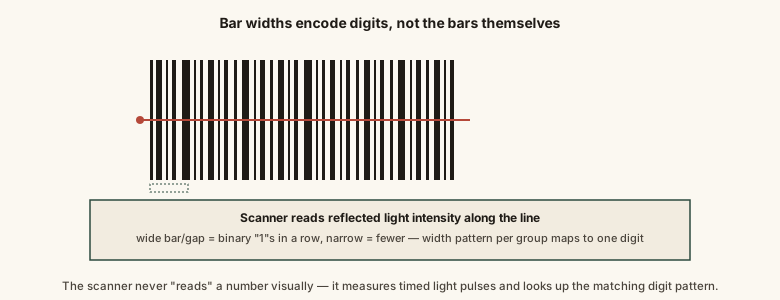
The scanner never "sees" a price at all in this process — it produces a number, and everything after that (price, product name, inventory update) comes from a separate database lookup keyed on that number.
Common mistakes
Common Mistakes
Assuming a barcode has a price physically encoded inside it.
→ A barcode encodes an identifying number only — price is looked up separately from the store's database at the moment of scanning, which is why prices can change without reprinting labels.
Believing a scanner reads the black bars themselves as the meaningful part of the pattern.
→ It's the precise widths of both the bars and the white gaps between them that encode the data — width, not blackness, is what carries information.
Assuming identical products always carry different barcodes at different stores.
→ The manufacturer-assigned barcode number is typically the same everywhere that exact product is sold — what differs between stores is the price attached to that number in each store's own system.
Thinking a barcode scan failure means a wrong item might get rung up silently.
→ A built-in check digit lets the system detect most inconsistent or corrupted reads and reject them outright, rather than accepting and ringing up an incorrect number.
Common misconception
“Scanning a barcode looks up the price stored inside the barcode's pattern.”
A barcode's pattern of bars and gaps only ever encodes a short identifying number — never a price. The price a register displays comes from a separate, real-time lookup in the store's own point-of-sale database, using that scanned number as the search key. This is exactly why a store can run a sale, raise a price, or run a discount instantly across every register without touching a single printed barcode label.
What to do next
What to do next
- If a barcode scan seems to show an unexpected price, remember the barcode itself isn't the source of the price — a store's system or a mispriced shelf tag usually is.
- Keep printed barcode labels flat, clean, and undamaged where possible — scanning reliability depends entirely on clean, measurable bar and gap widths.
- If you're curious, look at the human-readable digits printed under any barcode — that's the same number the scanner decodes, provided as a manual backup.
- Read the related entry on how a QR code stores information to compare this one-dimensional approach against a two-dimensional one that can hold far more data.