 KnowThis
Key Takeaways
Key Takeaways
- 1A QR code doesn't fetch its content from the internet — the data is encoded directly in the pattern of black and white squares itself, readable by any camera with the right software, offline.
- 2Built-in error correction is why a QR code still scans correctly even with a logo covering part of it, or after some smudging or minor damage — a portion of the pattern is mathematically redundant on purpose.
- 3A QR code's grid size (its version) and its error-correction level both trade off directly against how much actual data it can hold — more redundancy or a smaller grid means less room for content.
The concept
The "no internet required to read the pattern" part is the piece most people get backwards, so it's worth testing directly before moving on.
A phone with no cellular signal and WiFi turned off scans a QR code containing a block of plain text. What happens?
Worked examples
Example 1: Scanning a URL on a poster (baseline case)
At what point in scanning a QR code containing a URL does an internet connection actually become necessary?
Example 2: A QR code with a logo covering part of it (edge case / variation)
Why can a QR code with a logo covering its center still be scanned successfully?
Example 3: A wifi-login QR code vs. a boarding-pass QR code (real-world / applied case)
A wifi network's QR code typically encodes a short, structured string containing the network name and password directly — scanning it lets a phone join the network without anyone typing a password, because the credentials themselves are sitting right there in the pattern. A boarding pass QR code encodes something denser: a structured block of data including passenger name, flight number, seat, and a record locator, formatted to a standard airlines agree on so any airport scanner, from any airline's system, can read it consistently. Both are the exact same underlying technology — the only real difference is how much data is packed in and how that data is structured, which is a choice made entirely at the moment the code is generated, not a property of QR codes in general.
How it works (visual)
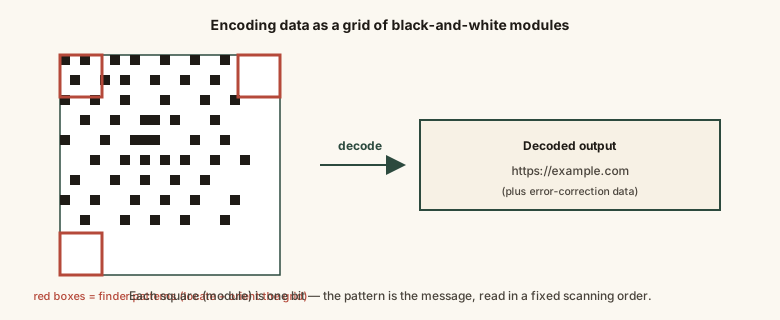
Every module in that grid plays one of a few defined roles — finder patterns for orientation, timing patterns for alignment, actual message data, and error-correction data — all specified precisely enough by the standard that any compliant scanner decodes the same code identically.
Common mistakes
Common Mistakes
Assuming a QR code can only ever store a website link.
→ A QR code can encode plain text, contact cards, wifi credentials, and other structured data — a URL is simply the most common use, not the only one.
Printing a QR code too small or too close to other elements, with no clear margin around it.
→ Leave the required quiet zone (blank margin) around the code, and print it large enough that its smallest modules stay clearly distinguishable at expected scanning distance.
Believing a bigger, denser QR code is automatically 'more secure.'
→ Grid size (version) determines data capacity, not security — a QR code has no built-in encryption or access control of its own.
Assuming heavy logo placement or decoration works the same on every QR code regardless of error-correction level.
→ Decorated or logo-carrying codes need a higher error-correction level generated on purpose — adding decoration to a low-error-correction code risks it failing to scan.
Common misconception
“A QR code connects to the internet to look up and retrieve its content when scanned.”
The content is embedded directly in the pattern itself at the moment the code is created — scanning it is an entirely offline, local decoding operation. An internet connection only becomes relevant afterward, and only if the decoded content happens to be a link the device then tries to open, or data the device chooses to send somewhere. The QR code itself never phones home.
What to do next
What to do next
- If you're generating a QR code with a logo or decoration, choose a higher error-correction level so it stays scannable.
- Test any QR code you plan to print at the actual size and distance it will be scanned from before finalizing the design.
- Remember that scanning a QR code is always local and offline — only the action it triggers (like opening a link) needs a connection.
- Read the related entry on how a barcode gets scanned to see the one-dimensional version of this same idea.