 KnowThis
Key Takeaways
Key Takeaways
- 1Email travels through a chain of standardized handoffs — your app to your outgoing server, a DNS lookup to find the recipient's server, then a direct server-to-server relay — defined by a decades-old protocol called SMTP.
- 2SMTP only handles sending and relaying. A completely separate protocol (IMAP or POP) is what your email app uses afterward to retrieve messages that have already arrived in a mailbox.
- 3"Undeliverable" bounce messages, delays, and spam filtering usually trace back to one specific hop in this chain failing or flagging the message — knowing the hops tells you where to look.
The concept
Once you see it as a chain of separate hops rather than one instant transfer, delays and bounce messages stop being mysterious — each hop is a place something can slow down, retry, or reject the message.
You hit send on an email. What is the very first thing that happens, before the message goes anywhere near the recipient?
Worked examples
Example 1: Sending a routine email between two providers (baseline case)
After DNS returns the recipient domain's MX record, what happens next?
Example 2: The recipient's mail server is temporarily down (edge case / variation)
An email arrives six hours after it was sent, with no error message to the sender. What most likely happened?
Example 3: Diagnosing why a business email keeps landing in spam (real-world / applied case)
A small business notices its invoices routinely land in customers' spam folders. Understanding the SMTP relay chain points directly at the fix: receiving mail servers check several signals during that direct server-to-server handoff, including whether the sending server's IP address is authorized to send mail for that domain (via DNS records like SPF) and whether the message is cryptographically signed as genuinely coming from that domain (via DKIM). A business sending mail through an unverified or improperly configured server gives receiving servers a legitimate reason to flag it as suspicious during that relay step, even though the message itself is perfectly legitimate. Fixing SPF and DKIM records at the DNS level — not rewriting the email's wording — is usually what resolves it.
A company's emails keep getting flagged as spam even though the content isn't spammy. Where in the delivery process is this most likely being decided?
How it works (visual)
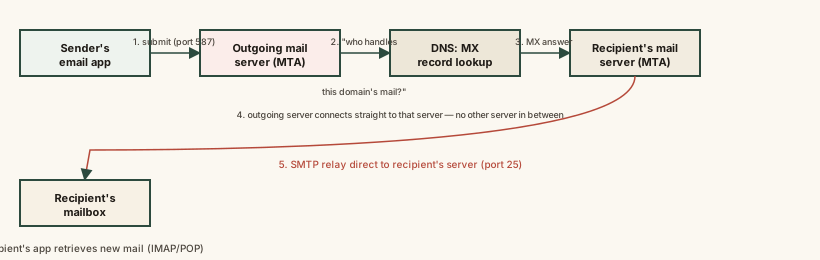
Notice there is no separate "email network" running in parallel to the internet — every one of these hops is an ordinary internet connection between two computers, just following the SMTP rulebook for what to say and in what order.
Common mistakes
Common Mistakes
Assuming email travels through one central mail hub run by 'the internet.'
→ There is no central hub — delivery is a direct, decentralized relay from the sender's outgoing server straight to the specific server DNS points to for that domain.
Thinking a delayed email with no error means something is broken.
→ SMTP is designed to retry quietly on temporary failures for a period before giving up — a delay with no bounce message is often just a successful retry in progress.
Believing SMTP handles both sending and reading email.
→ SMTP only covers sending and server-to-server relay. Retrieving mail into an app uses a separate protocol entirely — IMAP or POP.
Assuming spam filtering only looks at the words in the message.
→ Receiving servers check server-level and DNS-level authentication signals (like SPF and DKIM) during the relay itself — content is only one factor among several.
Common misconception
“Email is basically instant and works like a live phone call between two people's inboxes.”
Email is a store-and-forward system, not a live connection. Each hop — submission, DNS lookup, relay, storage — completes independently, and the message can sit queued at any one of them. It usually feels instant because each step normally takes well under a second, but nothing about the protocol guarantees real-time delivery, which is exactly why retries and delays are a normal, built-in part of how it works rather than a malfunction.
What to do next
What to do next
- Next time an email arrives late with no bounce message, remember that's SMTP's retry logic working as designed, not a failure.
- If you run a business sending email, check that your domain has correctly configured SPF and DKIM DNS records — misconfiguration there is a leading cause of legitimate mail landing in spam.
- When troubleshooting 'email isn't arriving,' mentally walk the chain — submission, DNS lookup, relay, recipient server, retrieval — to narrow down which hop is actually failing.
- Read What a CC and BCC Actually Do in Email next to see how the same message format (RFC 5322) controls who sees which recipients.