 KnowThis
Key Takeaways
Key Takeaways
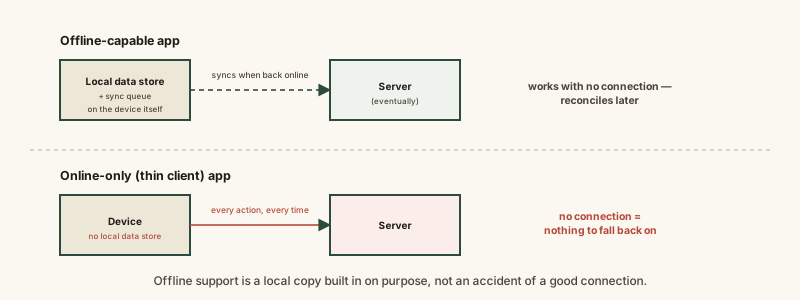
- 1Offline support isn't a side effect of a good connection — it's a deliberate architecture choice requiring a local copy of data on the device itself.
- 2A "thin client" app keeps little or nothing locally and depends on reaching a server for nearly every action, which is exactly why it breaks the instant a connection drops.
- 3An offline-capable app still needs internet eventually — it just delays and queues that dependency instead of requiring it for every single action in real time.
The concept
Once offline support is understood as work developers chose to do, rather than something that happens automatically whenever a connection is briefly unavailable, the pattern of which specific apps work offline and which don't stops looking arbitrary.
A note-taking app keeps working normally with no internet connection, while a separate live-chat app becomes completely unusable the moment the connection drops. What's the most likely explanation?
Worked examples
Example 1: A note-taking app that keeps working offline (baseline case)
A note-taking app lets someone view and create notes with no signal at all. What has to be true about how that app was built for this to work?
Example 2: A live video call app that fails immediately without a connection (edge case / variation)
Why is a video calling app much harder to make work offline than a note-taking app, even with equal development effort?
Example 3: An email app showing old messages but not sending new ones offline (real-world / applied case)
An email app shows a full inbox of previously downloaded messages while offline, and lets someone compose a new email that sits in an "outbox" until a connection returns, at which point it sends automatically. This is a deliberately partial offline design: reading relies on a local cache of already-downloaded messages, and composing relies on a local draft store with a queued outbox — but checking for genuinely new incoming mail is impossible without a connection, since that data doesn't exist locally yet by definition. This kind of mixed behavior — some features work offline, others clearly don't — is a direct, visible signal of exactly which parts of the app were built with a local data store and which weren't.
An email app lets someone read old messages and draft a new email while offline, but can't check for genuinely new incoming mail until a connection returns. Why the difference?
How it works (visual)
Common mistakes
Common Mistakes
Assuming any app 'should' work offline if it's simple enough.
→ Offline capability depends on whether developers built a local data store and reconciliation logic, not on how simple or complex the app's purpose looks from the outside.
Expecting genuinely real-time features (live calls, live chat delivery, live multiplayer) to work meaningfully offline.
→ Recognize that real-time interactions generally have no stable local state to fall back on — some categories of app are inherently much harder to support offline than others.
Assuming an app that shows old, cached content offline is fully functional offline.
→ Check which specific actions actually work without a connection — many apps mix cached viewing with features that still require a live connection, like sending or refreshing.
Common misconception
“If an app 'just works' without internet, that happened automatically because it's well-made.”
Offline support is a specific architecture decision, not a natural side effect of good software. Developers have to deliberately build a local data store on the device, decide what happens when local and server data disagree, and design how queued changes reconcile once a connection returns. Apps that don't work offline usually aren't badly made — they were simply built as thin clients, a legitimate and often simpler design choice for cases where near-constant connectivity is a reasonable assumption.
What to do next
What to do next
- Before relying on an app in a low-connectivity situation, test which specific features actually work offline rather than assuming the whole app does.
- Recognize real-time features (live calls, live chat, live multiplayer) as a category that's inherently much harder to support offline than stored, static data like notes or documents.
- If an app behaves inconsistently offline (some things work, others don't), treat that as a visible signal of which parts have a local data store behind them.
- Read Why Apps Need an Internet Connection to Sync next to see what happens once an offline-capable app's queued changes finally reconnect.