 KnowThis
Key Takeaways
Key Takeaways
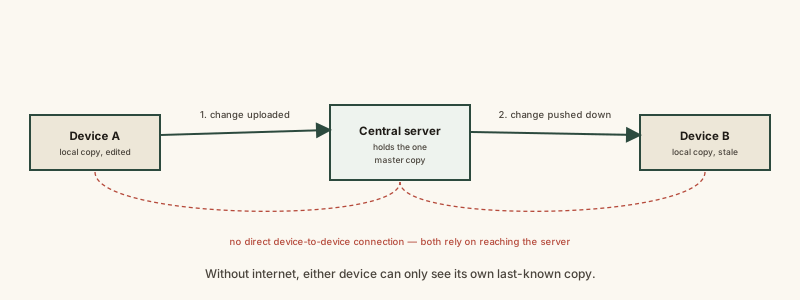
- 1Two devices almost never talk to each other directly to sync — both separately connect to the same central server, which is why sync fails the instant either one loses internet.
- 2A change made offline usually isn't lost outright; well-designed apps queue it locally and send it once a connection returns, though the two ideas get conflated in people's minds.
- 3When the exact same data is changed differently on two devices before either can sync, that's a genuine conflict a system has to resolve, not a bug — the resolution rule differs by app.
The concept
Once sync is understood as "both devices separately reaching one shared server," rather than devices magically talking to each other, offline behavior, sync delays, and conflicts all become predictable consequences of that one design, instead of unrelated glitches.
Someone edits a note on their phone while it's in airplane mode, and the same note isn't showing that edit yet on their laptop. What's the most accurate explanation?
Worked examples
Example 1: Adding a task on one device, seeing it on another (baseline case)
A new task added on a phone appears on a laptop a few seconds later, in the same to-do app. What actually made that possible?
Example 2: Editing the same document offline on two devices (edge case / variation)
A document was edited differently on two offline devices before either could sync. Why can't the app just automatically know which edit is 'correct'?
Example 3: A team messaging app during a network outage (real-world / applied case)
During an office-wide internet outage, employees can still send messages within a team messaging app, but no one outside the office sees them arrive, and no new messages from outside appear either. The app queues each locally composed message rather than discarding it. The moment the connection returns, every queued message uploads to the central server in order, and the server relays them onward to everyone else, who then see a burst of messages appear all at once rather than one at a time — a visible reminder that the "instant" feeling of messaging depends entirely on a continuously available path to that shared server.
After an office-wide internet outage ends, a burst of queued messages suddenly appears all at once in a team messaging app. What does this burst reveal about how the app handled the outage?
How it works (visual)
Common mistakes
Common Mistakes
Assuming two devices sync by connecting directly to each other.
→ Most apps route every device's changes through one shared central server — reconnect the device to the internet, not to the other device, to fix a stalled sync.
Panicking that an offline edit is permanently lost.
→ Check whether the app queues offline changes for later upload — many well-designed apps do, and the change appears once a connection returns.
Assuming a sync conflict between two edited versions is a bug that shouldn't happen.
→ Recognize it as an expected outcome of two offline edits to the same data — the real question is just which conflict-resolution rule the app applies (most-recent-wins, manual choice, or merge).
Common misconception
“Sync happens instantly and automatically no matter what, as if the devices are always quietly talking to each other.”
Sync only happens when a device can actually reach the central server it depends on. Without internet, a device is working from whatever state it last successfully synced — completely unaware of any changes made elsewhere in the meantime. "Instant" sync is really just a connection being available often enough that the delay is imperceptible, not a guarantee built into the concept of sync itself.
Try it yourself
Uses the same time = data / connection speed relationship that governs any network transfer, applied to a batch of pending sync changes.
A simplified estimate — real sync also includes server processing time and per-request overhead, not just raw transfer time.
What to do next
What to do next
- If a device 'won't sync,' check its own internet connection first — sync depends on reaching a shared server, not on the other device.
- Before assuming an offline edit is lost, check whether the app shows a pending or queued-changes indicator.
- If you ever see a 'conflicting versions' prompt, understand it as two valid offline edits colliding, not a broken app.
- Read Why Some Apps Work Offline and Others Don't next to see the deliberate design work that makes queued offline changes possible at all.