 KnowThis
Key Takeaways
Key Takeaways
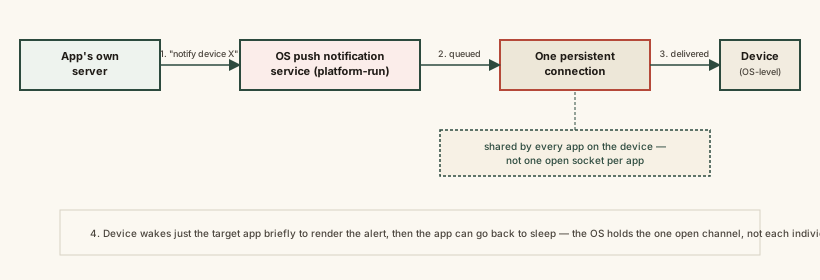
- 1A push notification doesn't arrive because an app was quietly running and checking for updates — it travels through one shared, always-on connection the device's operating system maintains to a central notification service.
- 2An app's own server never contacts your phone directly. It hands the notification to the notification service, which is the only thing actually holding a connection open to your device.
- 3This shared-channel design is why notifications keep arriving even when an app is fully closed, and why disabling notifications for one app doesn't affect any other app's ability to receive them.
The concept
Once you see the notification service as the only thing actually holding a connection to your device, several everyday behaviors — notifications surviving a fully closed app, silent failures when the token goes stale, one setting controlling one app's alerts — stop looking like inconsistencies and start looking like the predictable result of one shared pipe serving many senders.
An app has been fully closed (not just backgrounded) for hours, but a notification from it still shows up. How is that possible?
Worked examples
Example 1: A single alert arriving on one device (baseline case)
Why does a push notification usually arrive within a second or two, even though the app itself wasn't running?
Example 2: A stale or invalid device token (edge case / variation)
Someone stopped receiving notifications from an app after resetting their phone, with no error or setting change visible to them. What is the most likely cause?
Example 3: Choosing which notifications to allow (real-world / applied case)
Someone is deciding which of their dozens of installed apps should be allowed to send notifications. Understanding the mechanism clarifies the decision: granting notification permission to an app doesn't give that app its own hidden always-on connection or extra background access — it only tells the shared notification service "deliver this app's alerts through the channel that's already open anyway." Denying permission to a rarely used app costs essentially nothing in terms of battery or connectivity elsewhere, since the shared channel to the notification service stays open regardless — the setting is purely a per-app filter on what gets displayed, not a separate resource being switched on or off.
Does denying notification permission to one app reduce the battery or connectivity cost of the shared connection used by other apps' notifications?
How it works (visual)
Common mistakes
Common Mistakes
Assuming each app keeps its own private connection running in the background to check for notifications.
→ Apps don't maintain their own connections for this — one operating-system-level notification service holds a single shared connection per device and relays alerts for every app.
Believing disabling notifications for one app frees up battery or a 'connection slot' for others.
→ The shared connection to the notification service stays open regardless of any single app's permission setting — denying one app is a display filter, not a resource being freed.
Assuming a missed notification means the app is broken.
→ A common, quieter cause is a stale device token after a reinstall or device reset — reopening the app to re-register usually resolves it.
Thinking a push notification means the app was actively running the whole time.
→ The entire design exists so notifications can be delivered while an app is fully closed — the notification service, not the app, holds the connection.
Common misconception
“Every app on my phone has its own live connection running in the background to send me notifications instantly.”
A device typically maintains exactly one persistent connection to its operating system's notification service, and every app's alerts are relayed through that same shared channel. An app's own server never talks to your phone directly — it hands its notification to the notification service, addressed with a device token, and the service does the actual delivery. This is precisely what allows notifications to arrive even when an app has been fully closed for hours.
What to do next
What to do next
- If notifications from one specific app suddenly stop with no setting change, try reopening that app first — a stale device token after a reinstall or reset is a common, easy fix.
- Remember that disabling notifications for a rarely used app is a display filter, not a meaningful battery or performance change elsewhere on the device.
- When troubleshooting delayed notifications, consider network conditions on the device broadly, since all apps share the same underlying connection to the notification service.
- Read Why Some Messages Say 'Delivered' But Not 'Read' next to see how a notification arriving is a different event entirely from a message being opened.