 KnowThis
Key Takeaways
Key Takeaways
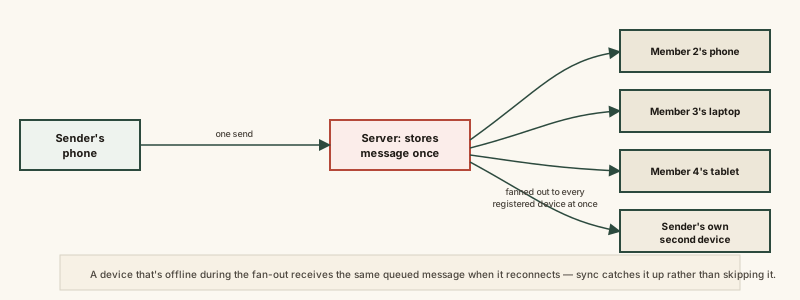
- 1A group message travels to one server once, which then fans out an individual copy to every member's registered devices — phones don't send messages directly to each other in a group.
- 2The server keeps a group membership list and checks it on every new message, which is also why adding or removing someone changes who future fan-outs reach immediately.
- 3The same fan-out applies to a single person's own multiple devices, which is why a message and its read/delivered status appear consistently on someone's phone, tablet, and computer at once.
The concept
Once a group chat is understood as one message, stored once, fanned out many times, several everyday quirks — new members not seeing old history, one device lagging briefly behind the others, removed members losing access going forward but not retroactively — stop looking like bugs and start looking like the predictable shape of a fan-out system. The human side of that fan-out, one message landing on many phones at once, is what group chat etiquette is built around.
In a group chat with six people, when someone sends a new message, how does it actually reach the other five?
Worked examples
Example 1: A message sent to an active group (baseline case)
A person sends a group message from their phone, and it also appears moments later on their own laptop, where they're logged into the same account. Why?
Example 2: A member's device briefly offline during fan-out (edge case / variation)
One group member's phone loses connection for thirty seconds right when a new message is sent. What happens to that message for them?
Example 3: Adding a new member partway through a conversation (real-world / applied case)
A group chat has been running for months when a new person is added. Understanding the membership-list mechanism explains a very common point of confusion: the new member is added to the group's membership list going forward, so they'll receive fan-out delivery of every message sent from that point on, exactly like existing members. Whether they can also see the months of prior history depends entirely on how that specific app handles history for new joiners — some fan out the existing message history to a new member's device at the moment they join, while others start the new member's view from a blank slate. This isn't a sync failure either way; it's a separate design decision about historical access, distinct from the ongoing fan-out mechanism that handles everything sent afterward.
A new member is added to a group chat that's been active for months. Will they definitely be able to scroll up and see all the old messages?
How it works (visual)
Common mistakes
Common Mistakes
Assuming group messages travel directly between members' phones.
→ Every message goes to the server once, which stores it and fans out an individual copy to each member's registered devices — there's no direct phone-to-phone exchange.
Treating a brief lag on one person's device as a broken sync.
→ Group chats are generally built around eventual consistency — a temporarily unreachable device queues and catches up shortly after reconnecting, which is normal, expected behavior.
Assuming a newly added member can automatically see the group's entire prior history.
→ This depends on the specific app's design — some share prior history with new joiners, others start their view from the point they joined.
Thinking multi-device sync (phone and laptop, for instance) is a separate feature from group chat delivery.
→ Both rely on the exact same fan-out mechanism — every device registered to an account is simply another target on the delivery list.
Common misconception
“In a group chat, everyone's devices are directly connected to each other, syncing the conversation between themselves.”
No device connects directly to any other device in a group chat. Every message goes to the messaging service's server once, which stores it and then fans out an individual copy to each recipient's registered device — including a sender's own other devices logged into the same account. This centralized fan-out is what allows a group to scale from a handful of people to hundreds without each device needing to manage direct connections to every other participant.
What to do next
What to do next
- If one device in a group chat seems briefly behind the others, give it a moment to reconnect and catch up before assuming something is broken.
- Before adding someone to a long-running group, check whether your specific app gives new members access to prior history, since this varies by platform.
- Remember that removing a member changes the group's membership list going forward — it doesn't retroactively remove messages they already received.
- Read End-to-End Encryption Explained next to see how group chats handle this same fan-out while still keeping message content private from the server.