 KnowThis
Key Takeaways
Key Takeaways
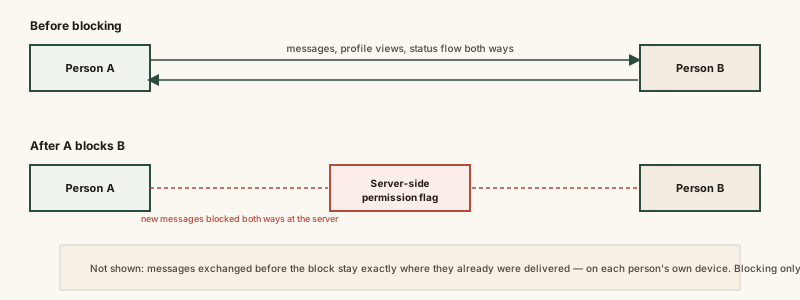
- 1Blocking sets a permission flag on the server tied to the relationship between two accounts — every future message or view attempt gets checked against it, and blocked interactions are rejected before they reach the other person.
- 2Blocking is not retroactive. It stops new interactions going forward; it does not delete, hide, or unsend messages, photos, or calls that were already exchanged before the block.
- 3Because the check happens on the server, blocking works the same way regardless of which device either account uses afterward — it isn't a setting stored only on one phone.
The concept
Once you see blocking as a forward-looking permission check rather than a rewind button, a lot of confusion about what does and doesn't survive a block clears up immediately.
After Person A blocks Person B, what happens to the messages they exchanged the week before the block?
Worked examples
Example 1: A straightforward block between two accounts (baseline case)
After being blocked, Person B sends a new message that appears to go through on their own screen. Does it reach Person A?
Example 2: Blocking on one device but staying logged in elsewhere (edge case / variation)
Someone blocks another account using their phone app. Does the block also apply if they later log into the same account on a computer's web browser?
Example 3: Deciding what blocking will and won't solve (real-world / applied case)
Someone wants to stop unwanted contact from a specific account and also wants embarrassing photos they previously sent that person permanently gone. Blocking solves the first goal directly — it stops all future messages, calls, and visibility between the two accounts, enforced at the server. It does not solve the second goal at all: any photos or messages already delivered to the other person's device before the block remain there, since blocking is a forward-looking permission change, not a retroactive deletion. Someone with that second goal needs to separately request deletion of specific content, understanding that once something has been delivered to another person's device, no permission setting can reach back and remove it from a device outside the sender's control.
Someone blocks a person specifically hoping it will also erase photos they'd already sent that person before the block. Will blocking achieve that?
How it works (visual)
Common mistakes
Common Mistakes
Assuming blocking someone deletes past messages or photos for both people.
→ Blocking is a forward-looking permission change enforced at the server — anything already delivered before the block stays exactly where it was.
Believing a blocked person can't tell they've been blocked at all.
→ Depending on the app, indirect signals (a message never showing as delivered, a profile becoming inaccessible) can reveal a block even without an explicit notification, though this varies by platform and isn't guaranteed.
Thinking a block needs to be re-applied on every device or app the blocking person uses.
→ Since the permission flag is stored server-side against the account relationship, it applies uniformly no matter which device either account logs in from.
Assuming blocking automatically deletes the entire conversation history from the blocking person's own device too.
→ Blocking and deleting conversation history are typically separate, independent actions — check your app's specific options if you want both.
Common misconception
“Blocking someone erases everything about the relationship — messages, photos, and history — for both people.”
Blocking changes a permission flag checked on every future interaction attempt between two accounts — it stops new messages, calls, and visibility going forward. It is explicitly not retroactive: content already delivered to a device before the block remains there, on both sides, because the server has no mechanism to reach into a device it doesn't control and remove content that already arrived. Deleting existing content, where an app offers that option, is a separate action a person has to take independently.
What to do next
What to do next
- If your goal is removing already-sent content, look for a separate delete or unsend option — blocking alone won't reach content already delivered elsewhere.
- Remember a block applies across every device tied to an account automatically, since the check happens server-side, not per device.
- Don't assume a block is instantly or reliably detectable by the other person — indirect signals vary by app and aren't a guaranteed notification.
- Read Why Some Messages Say 'Delivered' But Not 'Read' next to see other reasons a message can stall besides being blocked.