 KnowThis
Key Takeaways
Key Takeaways
- 1A read receipt fires the moment a message is rendered on screen — it's a technical event, not a report of whether the person consciously registered what it said.
- 2A typing indicator is a separate, temporary signal tied to activity in a text field, automatically sent and automatically cleared, independent of the message state itself.
- 3Both are just two more pieces of synchronized state layered on top of a message, working the same way delivery status does — devices reporting a small update to a server, which relays it to the other side.
The concept
Once read receipts and typing indicators are understood as two separate automated status signals — one about a message, one about a text field — a lot of the social anxiety people build around them starts looking disproportionate to what the signal actually reports.
A message shows as 'read.' What has that status actually confirmed?
Worked examples
Example 1: A straightforward one-on-one conversation (baseline case)
In a normal conversation, what specifically triggers a typing indicator to appear for the other person?
Example 2: A message read from a notification preview (edge case / variation)
Someone reads a message's preview text in a notification banner without opening the app. Will this always mark the message as 'read'?
Example 3: Deciding whether to disable read receipts (real-world / applied case)
Someone feels pressured to reply instantly whenever a message shows as read, and considers turning read receipts off. Understanding the mechanism clarifies what that setting actually changes: disabling read receipts typically stops the device from sending that automatic "displayed" signal for messages they receive, which also commonly means they stop seeing other people's read receipts in return, since it's usually a mutual, two-way setting rather than something that can be turned off one-directionally. It doesn't change whether the message was delivered, and it doesn't affect the typing indicator, which is a separate feature with its own separate setting in some apps. Someone wanting less social pressure specifically from the read status, but who is fine with typing indicators, needs to check that these are controlled independently.
Someone disables read receipts to reduce pressure to reply instantly. What else does this most likely affect?
How it works (visual)
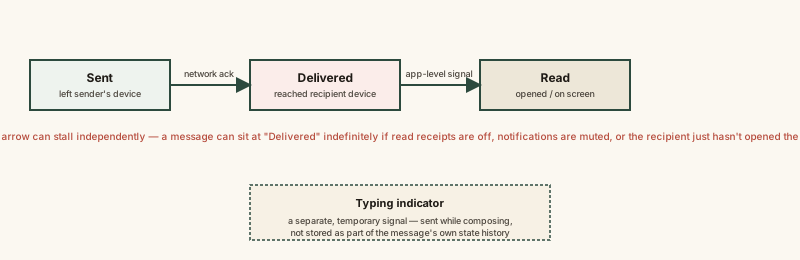
Common mistakes
Common Mistakes
Treating a 'read' status as proof the person consciously understood the message.
→ A read receipt reports that a message was rendered on screen — a technical event that can be triggered by a glance, a preview, or an accidental app opening, not comprehension.
Assuming typing indicators and read receipts are the same feature or controlled by one setting.
→ They're independently tracked signals with different triggers, and in many apps, separate on/off settings — check both if trying to change either.
Believing a disappearing typing indicator means the other person changed their mind about replying.
→ The indicator clears automatically after a short pause with no keystrokes, or once a different message is sent — it says nothing about the other person's intent.
Assuming read receipts work identically across every app and every version of a conversation.
→ Exactly which rendering event qualifies as 'read' (full conversation view vs. a notification preview, for instance) is an implementation choice that varies by app.
Common misconception
“If a message shows as 'read' and I don't get a reply, I'm being deliberately ignored.”
A read receipt confirms that a message was rendered on a screen — it does not confirm that the recipient consciously registered its content, has had time to think through a reply, or has any obligation to respond immediately. The signal is generated automatically by a device-level event, not a deliberate acknowledgment by the person, and treating it as proof of intent reads far more into a technical status update than the update is actually reporting.
What to do next
What to do next
- If read receipts create social pressure, check your app's settings — many treat it as a two-way toggle, so turning yours off usually also hides others' read status from you.
- Remember a typing indicator disappearing doesn't mean anything definitive — a paused reply, a distraction, or a changed message all clear it the same way.
- Don't treat 'read' as proof of comprehension or intent when interpreting a conversation — it's a rendering event, not a report on someone's attention.
- Read Why Some Messages Say 'Delivered' But Not 'Read' next to see the full range of reasons a message can stall at delivered.