 KnowThis
Key Takeaways
Key Takeaways
- 1Compatibility ultimately comes down to whether multiple apps and hubs can all read and change the same underlying device state consistently, not whether products share a brand name.
- 2Historically, this was mostly achieved by everyone in a household buying into one company's proprietary system; a shared interoperability standard achieves the same result without requiring brand lock-in.
- 3A device supporting a shared standard like Matter still needs an underlying communication protocol, such as Thread, to actually carry the data — the standard and the protocol solve different, related problems.
The concept
Once compatibility is understood as reliable state synchronization rather than brand-matching, it becomes much easier to predict which combinations of devices and apps will actually work together.
At its core, what does 'compatibility' actually mean when talking about smart home devices from different manufacturers?
Worked examples
Example 1: A single-brand household with guaranteed sync (baseline case)
Why does a single-brand smart home setup typically have no compatibility issues?
Example 2: Two brands that both claim a shared standard but use different protocols (edge case / variation)
Two devices from different brands use different underlying wireless protocols (one Thread, one Wi-Fi) but both correctly implement the same interoperability standard. What does this mean for compatibility?
Example 3: Checking compatibility before buying a new device (real-world / applied case)
Someone with an existing multi-brand smart home wants to add a new sensor and needs to know if it will actually work with their setup. Rather than checking whether the sensor's brand matches anything already owned, the practical check is whether the sensor is certified against the same interoperability standard the existing hub or app already supports, and whether its underlying protocol (Wi-Fi, Thread, Zigbee) is one that hub can actually speak. Both conditions typically need to be true for genuine, reliable compatibility — a device passing only one of the two checks may connect but behave inconsistently or require a workaround.
Before buying a new smart home sensor to add to an existing multi-brand setup, what two things is it most useful to check?
How it works (visual)
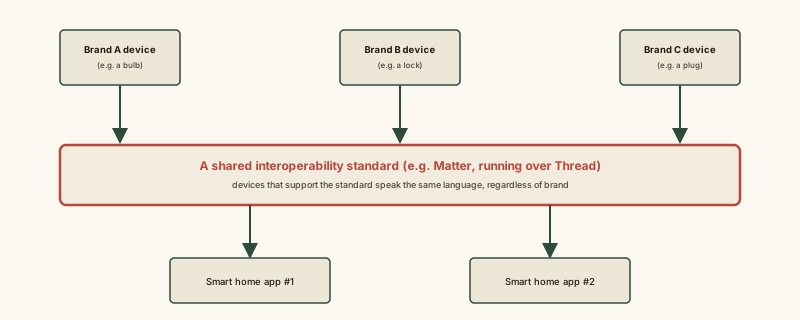
The shared standard in the middle of this diagram is what lets two different apps stay in sync about the same set of devices, even though neither app nor any of the three devices come from the same company.
Common mistakes
Common Mistakes
Assuming any smart device works with any hub or app just because both use the word 'smart' or a similar-sounding feature list.
→ Check for shared interoperability standard certification and matching underlying protocol support before assuming two products will actually sync state together.
Believing a single 'compatible' label on a product guarantees full functionality with every other compatible product.
→ Recognize that some advanced features are still brand-specific extensions layered on top of the shared standard — basic state (on/off, locked/unlocked) usually syncs reliably, but not every custom feature necessarily does.
Treating a proprietary single-brand ecosystem as an outdated or inferior approach compared to an open standard.
→ Understand both are legitimate ways of guaranteeing state synchronization — a single-brand system just achieves it through common ownership rather than a shared, independently verified standard.
Common misconception
“Any two smart home devices that are both labeled 'smart' or 'compatible' will automatically work well together.”
Genuine compatibility depends on whether devices and the apps controlling them actually agree on how to represent and synchronize the device's current state — which requires both implementing a shared interoperability standard correctly and using a protocol the controlling hub or app can actually communicate over. A device can be technically "smart" and still fail to sync reliably with another brand's app if either of these pieces doesn't line up, regardless of how similar the marketing language sounds.
What to do next
What to do next
- Before buying a new smart device for an existing setup, check for certification against the same interoperability standard your hub or app already supports.
- Confirm the device's underlying wireless protocol (Wi-Fi, Thread, Zigbee, Z-Wave) is one your existing hub can actually communicate with.
- Don't assume advanced or brand-specific features will sync across ecosystems just because basic state (on/off, locked/unlocked) does.
- Read what a smart home hub actually does next to see how a hub fits into this same protocol-and-standard picture as the device that physically bridges everything together.