 KnowThis
Key Takeaways
Key Takeaways
- 1A newly discovered flaw in a device's software stays open until the manufacturer writes a fix and the device actually receives and installs it — nothing about the flaw resolves on its own.
- 2A device that still powers on and does its basic job can still be running software with a known, unpatched security flaw — "still works" and "still secure" are separate questions.
- 3The update chain has four steps (flaw found, fix written, sent, installed), and if any one of the last two steps never happens, the flaw remains open indefinitely.
The concept
Once you see updates as the only mechanism that actually closes a known flaw, it becomes clear why skipping them isn't a neutral choice — it's choosing to leave a specific, identified door unlocked.
A smart device is several years old, has never installed an update, but still performs its basic function correctly every day. What does this tell you about its security?
Worked examples
Example 1: A routine security patch reaching a smart camera (baseline case)
Which single step in the update chain is the one that actually closes a known flaw on a specific device?
Example 2: A device that stops receiving updates but keeps functioning (edge case / variation)
Why can a device with no ongoing update support still appear to be working perfectly fine to its owner?
Example 3: Deciding whether to keep using an older smart device (real-world / applied case)
Someone is deciding whether to keep using a smart door lock that's several years old. Checking the manufacturer's support page shows the device last received a firmware update over three years ago, with no announced end-of-support date but also no recent activity. Applying the trust-chain framework, the practical question isn't "does it still lock and unlock correctly" (it does) but "is the update chain for this device still active" — and a multi-year gap with no announced ongoing support is a meaningful signal that any newly discovered flaw in that lock's firmware may never reach steps three and four. This is exactly the kind of decision the trust-chain model is built to support: it turns a vague worry into a specific, checkable question.
When deciding whether an older smart device is still reasonable to rely on, what does the trust-chain framework suggest checking first?
How it works (visual)
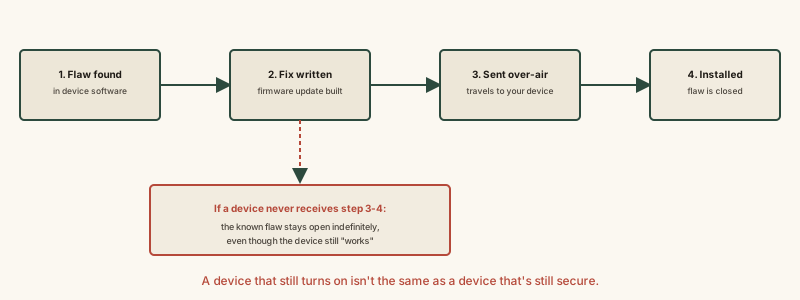
Every step in this chain has to complete for a specific flaw to actually close — a break at any point after discovery leaves that flaw open on your device, invisibly, no matter how normally the device continues to function.
Common mistakes
Common Mistakes
Assuming a smart device works fine forever without updates, so updates are optional.
→ Recognize that 'working fine' only means the original code is still executing — it says nothing about whether newly discovered flaws in that code have been fixed.
Postponing update notifications indefinitely because they seem inconvenient.
→ Treat security-related update notifications as time-sensitive, since a known flaw stays open on your specific device for every day the update chain's final step doesn't complete.
Assuming all smart devices update automatically forever with no owner involvement needed.
→ Periodically check a device's manufacturer support page for its actual update history and whether ongoing support is still active — some devices require the owner to check for and approve updates manually.
Common misconception
“If a smart device is still doing its job normally, it doesn't need updates.”
Whether a device performs its basic function and whether it's currently secure are two separate, independent facts. A device's original code keeps running exactly as it was written whether or not a flaw has since been discovered in it — a flaw doesn't stop a device from working, and a device continuing to work is not evidence that no flaw exists. Only an actual installed update closes a specific known flaw; normal day-to-day function tells you nothing about that.
What to do next
What to do next
- Enable automatic updates where a device offers the option, so the delivery and installation steps don't depend on you remembering to check.
- Periodically check a device's manufacturer support page to confirm updates are still being actively issued for your specific model.
- Don't dismiss a security-related update notification as optional — treat it as closing a specific, identified flaw, not just adding minor features.
- Read why smart devices can stop working if the company shuts down next to see what happens when the other end of this update chain disappears entirely.