 KnowThis
Key Takeaways
Key Takeaways
- 1Most smart doorbells and cameras stay in a low-power state and rely on a passive infrared (PIR) sensor to detect a change in heat and motion before the camera itself even wakes up.
- 2Once triggered, software checks the moving object's size, shape, and location against defined motion zones, and only sends an alert if it passes both filters.
- 3This is a two-stage feedback loop, not constant full-video analysis — the design specifically trades some detection delay and occasional missed edge cases for lower power use and fewer false alerts.
The concept
Understanding this two-stage design explains both why smart doorbells can run for months on a battery and why they occasionally miss something or flag the wrong thing.
What is the correct order of operations when a smart doorbell detects a person approaching?
Worked examples
Example 1: A person walking up to the front door (baseline case)
Why does a passing visitor's approach typically trigger a fast alert compared to something like a moving car far down the street?
Example 2: A false positive from a passing car or moving branch (edge case / variation)
A doorbell keeps sending alerts for cars passing on a public street beyond the owner's property. What's the most direct fix, given how the two-stage detection system works?
Example 3: Configuring zones and sensitivity for a busy front porch (real-world / applied case)
A household with a front porch facing a busy sidewalk wants alerts only for people approaching the actual door, not pedestrians walking past on the sidewalk. Using the doorbell app's zone editor, they draw a near zone covering just the walkway and porch steps, excluding the public sidewalk entirely, and set sensitivity so it still reliably triggers on a person's approach without over-triggering on smaller motion like blowing leaves. This shows the practical value of understanding the two-stage system: rather than treating false positives as an unfixable flaw, the owner adjusts the specific software-side setting (zones, sensitivity) that actually controls the behavior they want to change.
Why does adjusting motion zones and sensitivity settings, rather than the PIR sensor's hardware, solve most unwanted-alert problems for a busy porch?
How it works (visual)
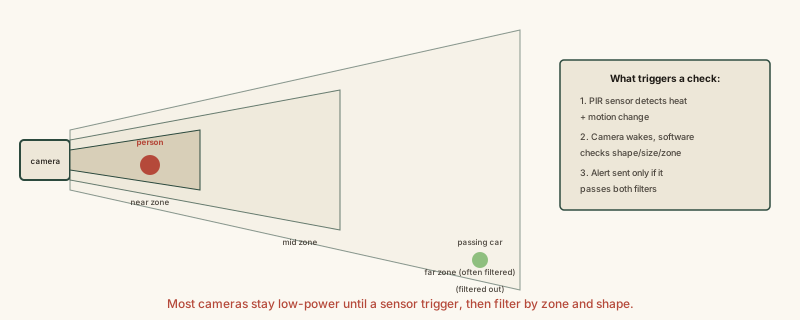
The car in the far zone in this diagram illustrates exactly why zone configuration matters: the same motion that would trigger an alert in the near zone gets filtered out once it's recognized as outside the area the owner actually cares about.
Common mistakes
Common Mistakes
Assuming a smart camera analyzes full video constantly, the same way a person watching a live feed would.
→ Recognize the low-power PIR-first design — full video analysis typically only kicks in after an initial heat-and-motion trigger, not continuously.
Treating every false-positive alert as a hardware defect that needs replacing.
→ Check motion zone and sensitivity settings first — most unwanted alerts (passing cars, distant pedestrians) are a software filtering configuration issue, not a broken sensor.
Assuming a missed detection means the device failed completely.
→ Understand that a PIR sensor reacts to heat-and-motion combinations, so unusual cases (a heat source with no motion, motion without a strong heat signature) can occasionally fall outside its detection pattern by design.
Common misconception
“A smart doorbell or security camera is always actively analyzing everything in view, the way a human watching a monitor would.”
Most devices stay in a low-power state and rely on a cheap, always-on PIR sensor to detect heat-and-motion changes first. Only after that initial trigger does the camera wake and run software analysis on shape, size, and configured zones, sending an alert only if both stages pass. This two-stage design is what makes long battery life and low standby power possible — it also explains why zone and sensitivity settings, not the camera hardware itself, are usually the right thing to adjust when alerts feel wrong.
What to do next
What to do next
- Configure motion zones to cover only the areas you actually want alerts for, excluding public sidewalks or streets if false positives are frequent.
- Adjust sensitivity settings gradually rather than assuming a persistent false-positive problem requires new hardware.
- Remember that a missed detection during unusual conditions (extreme heat, very fast motion) is a known limitation of PIR-based triggering, not necessarily a malfunction.
- Read how a smart thermostat actually learns your habits next to see the same sense-compare-adjust feedback loop applied to a very different smart device.