 KnowThis
Key Takeaways
Key Takeaways
- 1A smart speaker's microphone is always capturing sound, but a small on-device processor only checks it for a wake-word pattern — that check happens locally, not in the cloud.
- 2Audio is only sent to a remote server after the wake word is matched; everything that doesn't match is discarded on the spot and never transmitted.
- 3This is still a real privacy trade-off worth understanding, even though it's a far narrower one than "the device streams everything you say, all the time."
The concept
Understanding this boundary — what stays local versus what gets sent out — is the key to reasoning correctly about what a smart speaker can and can't know about you.
A smart speaker's owner says a sentence in another room that doesn't include the wake word. What most likely happens to that audio?
Worked examples
Example 1: Saying the wake word and asking a question (baseline case)
What specifically triggers a smart speaker to start sending audio to a remote server?
Example 2: A false wake from a similar-sounding word (edge case / variation)
Why can a smart speaker sometimes activate on a word that isn't actually its wake word?
Example 3: Reviewing and managing a voice assistant's activity history (real-world / applied case)
Most voice assistant platforms provide an activity dashboard showing a log of past voice interactions, including any accidental activations, with options to play them back, delete individual entries, or delete history automatically after a set period. Understanding the local-processing model explains why this dashboard only ever shows moments that triggered a wake-word match — it isn't a transcript of everything ever said in the room, because everything else was discarded locally and never reached the account in the first place. Reviewing this history periodically is a practical way to confirm what has actually been sent, rather than guessing.
Why does a smart speaker's voice-history dashboard only ever contain moments that started with the wake word, rather than a continuous transcript of all nearby sound?
How it works (visual)
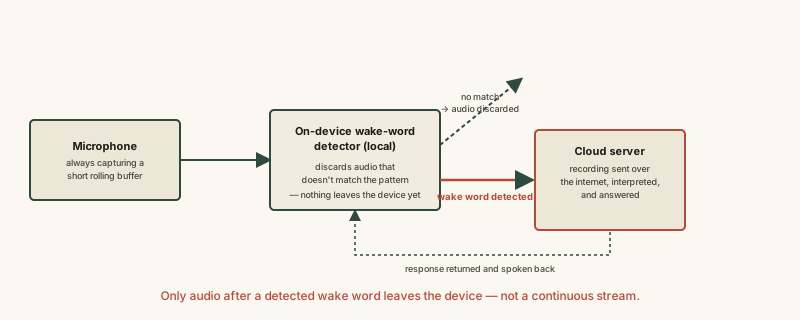
The dividing line in this diagram — the local wake-word box — is the entire reason a smart speaker can honestly be described as "always listening" for one specific pattern while also honestly not streaming continuous audio to a remote server.
Common mistakes
Common Mistakes
Assuming a smart speaker is always recording and sending everything you say to the cloud.
→ Recognize the wake-word gate — a local processor checks and discards audio on-device, and only a wake-word match triggers transmission to a remote server.
Believing a muted or unplugged smart speaker is functionally identical to one that's just sitting quietly.
→ Understand that physically muting the microphone (via a hardware switch, where available) or powering the device off is a stronger guarantee than assuming software alone is enough, if that level of certainty matters to you.
Treating an occasional accidental activation as proof the device is secretly recording constantly.
→ Recognize false wakes as a known limitation of acoustic pattern matching — check the activity history to see exactly what was actually transmitted, rather than assuming the worst.
Common misconception
“A smart speaker is always recording and sending audio to the cloud, all the time.”
The microphone is always capturing sound, but a local, on-device process checks it against a wake-word pattern and discards anything that doesn't match — that check never leaves the device. Only audio following a detected wake word is transmitted to a remote server. This is still a real privacy consideration (false wakes happen, and voice history is stored once triggered), but it is a narrower and more specific mechanism than continuous, unconditional audio streaming.
What to do next
What to do next
- Check your voice assistant's activity dashboard periodically to see exactly what audio has actually been transmitted and stored.
- If a device has a hardware microphone-mute switch, understand that it's a stronger physical guarantee than software settings alone.
- Don't assume an accidental activation means constant recording — it's usually a documented false-wake limitation of pattern matching, not evidence of hidden surveillance.
- Read what a smart home hub actually does next to see how a speaker's voice commands often get routed onward to control other devices.