 KnowThis
Key Takeaways
Key Takeaways
- 1A smart home hub's core job is protocol translation — many smart devices don't speak Wi-Fi at all, and a hub is what lets them join a home network anyway.
- 2Low-power protocols like Zigbee, Z-Wave, and Thread exist specifically because always-on Wi-Fi radios drain battery-powered sensors far too quickly for daily use.
- 3A hub is not the same thing as a router — a router manages your Wi-Fi network, while a hub bridges devices that a router alone can never see or control.
The concept
Seeing a hub as a translator, not just a relay box, explains both why some smart homes need one and why others don't.
Why can't a typical Wi-Fi router alone control a battery-powered Zigbee door sensor?
Worked examples
Example 1: Adding a battery-powered Zigbee sensor to a Wi-Fi-only home network (baseline case)
A Wi-Fi-only home adds a Zigbee sensor but has no hub. What happens?
Example 2: A Wi-Fi-native smart plug that doesn't need a hub (edge case / variation)
Why can a Wi-Fi-native smart plug skip needing a hub, while a battery-powered Zigbee sensor generally can't?
Example 3: Building automation routines across mixed-protocol devices (real-world / applied case)
A household wants a routine where a Zigbee door sensor opening triggers a Wi-Fi-native smart bulb to turn on. Even though the two devices use entirely different wireless protocols, a hub makes this possible because it has already translated both into a shared internal format — from the hub's perspective, both devices are simply reporting status and accepting commands through the same interface, regardless of what protocol they physically use to communicate. This is the practical payoff of the translation role: automation logic can be written once, without the person setting it up needing to think about protocol differences at all.
Why can a single automation routine trigger devices that use completely different wireless protocols (like Zigbee and Wi-Fi) without the person setting it up needing to think about that difference?
How it works (visual)
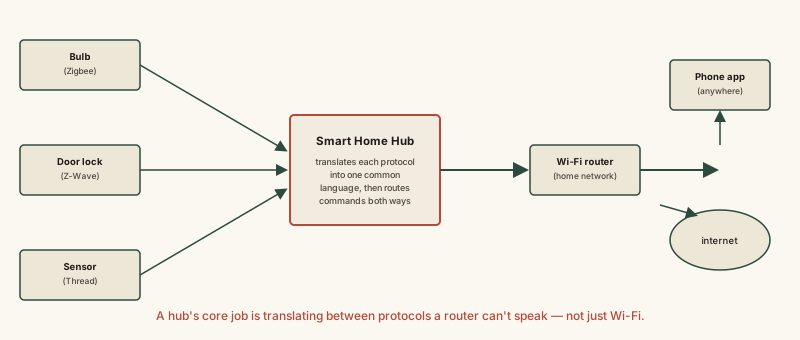
Everything to the left of the hub box in this diagram is protocols a standard router cannot speak; everything to the right is standard Wi-Fi and internet traffic. The hub is the only thing in the picture that understands both sides.
Common mistakes
Common Mistakes
Assuming a smart home hub is just a fancier Wi-Fi router.
→ A router manages your Wi-Fi network; a hub translates between other wireless protocols (like Zigbee or Z-Wave) and your network — they solve different problems and often work alongside each other.
Believing every smart device needs a hub to function.
→ Wi-Fi-native devices, typically ones that are always plugged into power, can connect directly to a router with no hub required — hubs matter specifically for low-power protocol devices.
Assuming any device from any brand automatically works with any hub.
→ A hub can only translate protocols it was actually built to support — check that a device's specific protocol (Zigbee, Z-Wave, Thread, etc.) is listed as compatible before buying.
Common misconception
“A smart home hub is basically just a second Wi-Fi router for smart devices.”
A hub's real job is protocol translation — bridging low-power wireless standards like Zigbee, Z-Wave, or Thread, none of which are Wi-Fi, into a format your Wi-Fi network and apps can work with. Many smart devices physically cannot connect to a router at all, not because of signal strength, but because their radios speak a completely different protocol than Wi-Fi. A hub exists specifically to solve that mismatch, which a router alone cannot.
What to do next
What to do next
- Before buying a smart device, check which wireless protocol it uses (Wi-Fi, Zigbee, Z-Wave, Thread) so you know whether a hub is required.
- If you already own a hub, confirm which specific protocols it supports before assuming a new device will be compatible with it.
- For battery-powered sensors, favor low-power protocols (Zigbee, Z-Wave, Thread) over Wi-Fi-native versions if battery life matters to you.
- Read what compatibility ecosystems mean for smart home devices next to understand how standards like Matter build on top of this same protocol layer.