 KnowThis
Key Takeaways
Key Takeaways
- 1A smart thermostat "learns" by logging every sensor reading and manual adjustment with a timestamp, then comparing new conditions against that stored history — it's pattern-matching, not genuine prediction of the future.
- 2The core mechanism is a repeating feedback loop: sense conditions, compare them to the learned pattern, adjust the setpoint, and repeat continuously.
- 3Because the system depends entirely on logged data, a sudden schedule change (a new job, a long trip) temporarily confuses it until enough new data overwrites the old pattern.
The concept
Once you see it as a logging-and-comparing loop rather than genuine foresight, both its convenience and its occasional mistakes make a lot more sense.
What is the most accurate description of how a smart thermostat 'learns' a household's routine?
Worked examples
Example 1: Learning a consistent weekday wake-up pattern (baseline case)
Why does a learning thermostat typically wait for roughly a week or more of consistent data before acting on a new pattern automatically?
Example 2: A temporary schedule change throwing off the pattern (edge case / variation)
After someone changes their morning schedule permanently, their smart thermostat keeps pre-heating at the old time for several more days. What does this indicate?
Example 3: Combining geofencing with logged schedule data (real-world / applied case)
A household uses a smart thermostat that combines a learned weekday schedule with geofencing based on residents' phone locations. On a day when everyone leaves early for a family event, the geofencing input detects the home is empty well before the usual logged departure time and adjusts the setpoint to an energy-saving mode immediately, rather than waiting for the normal scheduled time. This shows the feedback loop working with two simultaneous inputs — a slow-changing logged pattern and a fast-reacting real-time signal — layered together so the system can react correctly even when a given day breaks from the usual routine.
On a day the household leaves much earlier than usual, why might a smart thermostat still adjust correctly to an energy-saving setpoint despite the unusual timing?
How it works (visual)
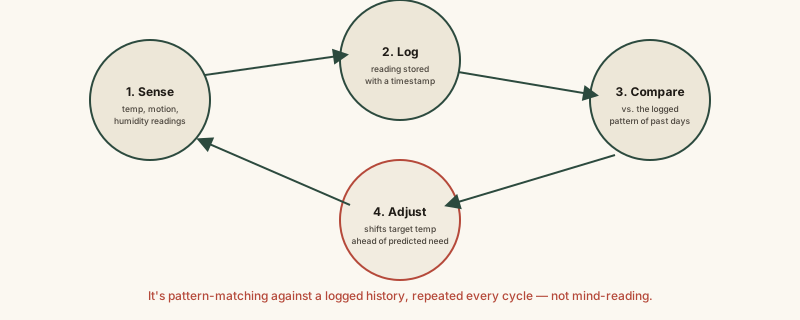
Every "smart" adjustment the thermostat makes traces back to this same four-step loop, run over and over — there's no separate mysterious prediction engine beyond this repeated cycle of comparing new data to old data.
Common mistakes
Common Mistakes
Assuming a learning thermostat understands why your schedule changed, rather than just noticing that it did.
→ Remember it's pattern-matching on logged data, not reasoning about causes — give it a week or two of consistent new behavior to relearn after a genuine schedule change.
Turning the temperature up or down constantly 'to help it learn faster.'
→ Frequent, inconsistent manual overrides actually slow down pattern recognition, since the system is looking for a consistent, repeated signal, not noise.
Assuming the thermostat's automatic pre-adjustment is a live prediction based on today's specific conditions.
→ It's typically based on historical timing patterns (and sometimes real-time occupancy/location data) — not a fresh, same-day forecast of your plans.
Common misconception
“A smart thermostat is genuinely predicting the future or reading your mind about when you'll want a temperature change.”
It has no awareness of your plans or intentions — it's comparing new sensor readings and timestamps against a stored history of your past manual adjustments, and acting when a strong enough repeated pattern shows up. That's a straightforward feedback loop built on logged data, not genuine prediction or understanding — which is exactly why a real schedule change temporarily confuses it until new data accumulates.
What to do next
What to do next
- Give a new smart thermostat one to two weeks of consistent, real manual adjustments before judging whether its 'learning' feature is working.
- After a genuine schedule change (new job, time zone, routine), expect a short lag before automatic adjustments catch up — this is normal, not a fault.
- If your model supports it, check whether geofencing or occupancy sensing is enabled, since these catch one-off exceptions the logged schedule alone would miss.
- Read how a smart home hub actually does next to see how a thermostat's data often feeds into a broader home automation system.