 KnowThis
Key Takeaways
Key Takeaways
- 1A smart TV's display panel is often built the same way as a regular TV's — the meaningful difference sits entirely in the layers of software added on top of it.
- 2Those added layers are an embedded operating system, an apps layer for streaming and other software, and a network/account layer connecting to the internet and signed-in services.
- 3A bigger or sharper picture is a separate, unrelated purchasing decision from whether a TV is "smart" — a regular TV and a smart TV can use the identical panel technology.
The concept
Once you separate the panel from the software stack sitting on top of it, comparing TVs (and deciding whether "smart" matters for your situation) becomes a much more specific exercise.
What is the core technical difference between a smart TV and a regular TV?
Worked examples
Example 1: Streaming a show directly on a smart TV vs. through a connected device (baseline case)
When streaming the same show, what is the actual difference between doing it through a smart TV's built-in app versus through an external streaming device plugged into a regular TV?
Example 2: A high-end display panel sold in a non-smart configuration (edge case / variation)
A commercial-grade display has excellent picture quality but no built-in apps, operating system, or internet connection. What does this indicate?
Example 3: Deciding between a smart TV and a regular TV plus a streaming device (real-world / applied case)
Someone shopping for a new TV is deciding between a smart TV and a cheaper non-smart model paired with a separate streaming device. Understanding the layer model clarifies the actual trade-off: a non-smart TV plus an external device gets equivalent app functionality, and the streaming device can be replaced or upgraded independently later, while the smart TV bundles everything together at the cost of the TV's own software support becoming a factor in the TV's overall lifespan. Neither option is inherently better — the layer model just makes the actual decision (bundled convenience vs. independent upgradeability) explicit rather than vague.
What does separating a TV's display panel from its software layers clarify when choosing between a smart TV and a non-smart TV plus external streaming device?
How it works (visual)
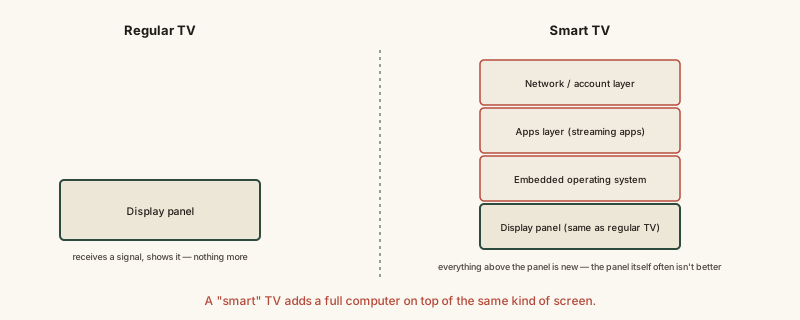
The bottom layer is identical in both columns of this diagram — the entire difference between a regular TV and a smart TV lives in the layers stacked above the display panel, not in the panel itself.
Common mistakes
Common Mistakes
Assuming a smart TV's main job or main selling point is a bigger or sharper screen.
→ Recognize that 'smart' refers entirely to the added software layers (operating system, apps, network/account layer) — picture quality is a separate spec that varies independently of smart functionality.
Assuming a non-smart display can't match a smart TV's app functionality.
→ Understand that pairing a non-smart display with an external streaming device generally provides equivalent app access, since the software layer just runs on separate hardware instead.
Treating a smart TV's software support as a one-time feature rather than something with its own lifespan.
→ Check a smart TV's expected software update support, since its embedded operating system and apps layer can become outdated or unsupported well before the display panel itself wears out.
Common misconception
“A smart TV's main advantage is that it has a better, sharper picture than a regular TV.”
Picture quality comes from the display panel, which a smart TV and a non-smart TV can share identically — panel technology and "smart" functionality are separate purchasing dimensions. A smart TV's actual difference is the embedded operating system, apps layer, and network/account layer added on top of that same kind of panel, letting it run streaming apps and connect to the internet directly rather than needing an external device plugged in to do that job.
What to do next
What to do next
- When comparing TVs, evaluate picture quality (panel technology) and smart functionality (software layers) as two separate specs rather than assuming one implies the other.
- Check a smart TV's software update support and history before buying, since its apps layer can become outdated well before the panel does.
- If a smart TV's built-in software feels slow or outdated, consider pairing it with an external streaming device rather than replacing the whole TV.
- Read what a smart home hub actually does next to see how a smart TV's network layer often connects into a broader home automation and voice-control setup.