 KnowThis
Key Takeaways
Key Takeaways
- 1Internet service providers advertise speed in megabits per second (Mbps), but file download progress bars and file sizes are measured in megabytes per second (MB/s) — and a byte is defined as exactly 8 bits.
- 2A '100 Mbps' connection therefore has a real-world maximum download speed of about 12.5 MB/s (100 ÷ 8), not 100 MB/s — this single factor-of-8 mix-up is the most common reason people believe their internet is running far slower than advertised.
- 3The gap is a units convention, not a performance shortfall: bandwidth has historically been measured in bits because it traces back to telecommunications engineering, while storage has always been measured in bytes because that's the unit computer memory is organized in.
The concept
Once the factor-of-8 is visible, most "my internet is slower than advertised" complaints turn out to be a units mismatch rather than an actual performance problem — though real bottlenecks do exist too, which is why the worked examples below cover both.
Someone pays for a '200 Mbps' internet plan and downloads a 1,000 MB file that takes 40 seconds. Is their connection underperforming?
Worked examples
Example 1: Converting an advertised plan speed to real download speed (baseline case)
Example 2: Estimating download time for a large file (edge case / variation)
Why might the actual download in Example 2 take noticeably longer than the calculated 22.2 minutes, even on a perfectly healthy connection?
Example 3: Comparing two ISP plans by real transfer speed (real-world / applied case)
How it works (visual)
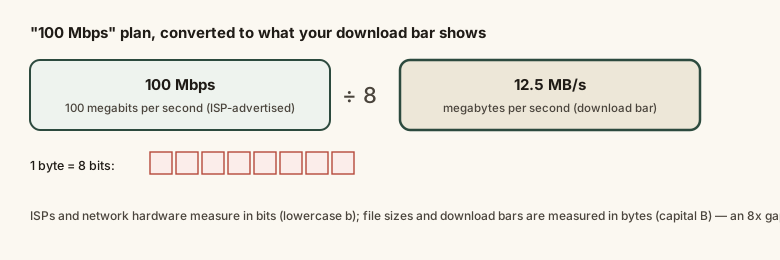
Every byte is built from exactly 8 bits, which is why the conversion between a bits-based advertised speed and a bytes-based observed speed is always the same single division — no lookup table required, unlike most unit conversions in this topic.
Common mistakes
Common Mistakes
Reading an advertised 'Mbps' plan speed as if it were already in MB/s, then concluding the connection is 8x slower than it should be.
→ Always divide the advertised Mbps figure by 8 before comparing it to a file size (in MB) or a download bar's displayed speed (in MB/s).
Comparing two ISP plans listed in different units (one in Mbps, one in MB/s) without converting them to the same unit first.
→ Convert both figures to the same unit — divide any Mbps number by 8 to get MB/s — before judging which plan is actually faster.
Assuming a download running noticeably below the calculated theoretical maximum means the internet connection itself is broken.
→ Check other links in the chain first — Wi-Fi signal strength, the server's own upload speed, and network congestion are all common real bottlenecks separate from the bits-vs-bytes conversion.
Common misconception
“If an ISP advertises '100 Mbps,' a customer should be able to download at 100 megabytes per second.”
Advertised internet speed is measured in megabits per second (Mbps), while file sizes and download progress bars are measured in megabytes per second (MB/s) — and a byte is fixed at 8 bits by definition. A 100 Mbps connection has a real-world maximum transfer rate of 100 ÷ 8 = 12.5 MB/s, not 100 MB/s. This is a units convention difference between the telecom industry (bits) and computing/storage (bytes), not a sign the ISP is underdelivering.
A file-sharing app shows a download progress bar reading '15.2 MB/s.' Roughly what internet plan speed, in Mbps, would this correspond to at full utilization?
Try it yourself
What to do next
What to do next
- Before judging a download as 'too slow,' divide your plan's advertised Mbps by 8 to get the real theoretical maximum in MB/s.
- When comparing two ISP plans, convert both figures to the same unit (Mbps or MB/s) before deciding which is genuinely faster.
- Use the calculator above to check your own connection's theoretical file-transfer ceiling against what a download bar actually shows.
- If real downloads run well below the theoretical MB/s ceiling even after converting units correctly, look at Wi-Fi signal, network congestion, or the source server's speed as the more likely bottleneck.