 KnowThis
Key Takeaways
Key Takeaways
- 1Decimal and binary are both place-value systems — a digit's value depends on which column it sits in — they just use a different base: 10 for decimal, 2 for binary.
- 2In binary, each column is worth a power of two (1, 2, 4, 8, 16, 32...) instead of a power of ten (1, 10, 100, 1000...), and only two digits, 0 and 1, exist to fill each column.
- 3Computers use binary because a transistor's two stable electrical states (on/off, high/low voltage) map naturally onto two digits — every digital storage and speed unit covered elsewhere in this topic ultimately traces back to this base-2 foundation.
The concept
The mechanical process for converting between the two systems is the same regardless of direction — decode each column's contribution and add them up, or repeatedly divide to find which columns should be "on."
In binary, why is there no digit '2'?
Worked examples
Example 1: Reading a binary number's decimal value (baseline case)
Example 2: Converting a decimal number into binary (edge case / variation)
When converting decimal 25 to binary by repeated division, why are the remainders read from bottom to top rather than top to bottom?
Example 3: Why storage units compound in powers of two (real-world / applied case)
How it works (visual)
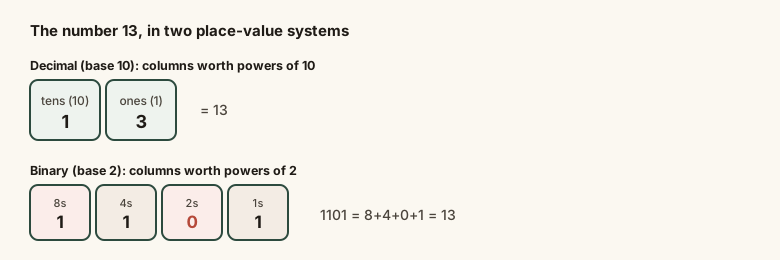
Both representations describe the identical quantity, thirteen — the columns are simply worth different amounts depending on the base, and binary needs more columns (more digits) to express the same number because each column can only hold a 0 or a 1.
Common mistakes
Common Mistakes
Reading a binary number by just adding up its digits as if they were decimal digits (e.g. treating 1101 as 'one thousand one hundred one').
→ Convert column by column using powers of two — 1101 in binary is 13, not a decimal-looking number at all.
Assuming binary numbers are always longer/harder purely because they 'look' complicated with many digits.
→ Recognize that binary needs more digits for the same value only because each column can hold just 0 or 1 — the underlying number system is no more complex, just less compact.
Forgetting that the repeated-division method for decimal-to-binary conversion produces remainders in reverse order.
→ Always read the remainders from the last division performed back to the first — bottom to top.
Common misconception
“Binary is a fundamentally different, more 'advanced' kind of math than the regular numbers people use every day.”
Binary and decimal are the same underlying idea — place value, where each column is worth a fixed multiple of the column to its right — differing only in the base (2 vs 10). Any number expressible in decimal is exactly as expressible in binary; the choice of base is a representation convention, not a difference in what kinds of numbers or math are possible.
A computer memory chip has enough addressing capacity for exactly 2^16 distinct memory locations. In decimal, how many locations is that?
Try it yourself
What to do next
What to do next
- Practice reading a short binary number (4-5 digits) by adding up its powers-of-two columns, rather than trying to memorize conversions.
- Use repeated division by 2, reading remainders bottom to top, whenever you need to convert a decimal number into binary by hand.
- Notice where powers of two (256, 512, 1024, 4096...) show up in specs you encounter — storage, memory, screen resolutions — and connect them back to this binary foundation.
- Use the calculator above to check your own binary conversions before trusting them.