 KnowThis
Key Takeaways
Key Takeaways
- 1Urgency and importance are separate dimensions, not two words for the same thing — a task can be urgent without being important, or important without being urgent.
- 2The matrix produces four categories, each with its own correct response: do it now, schedule it, delegate it, or eliminate it entirely.
- 3The most common failure mode it's built to catch is spending most of your time on urgent-but-unimportant tasks, which crowd out the important-but-not-urgent work that actually drives long-term results.
The concept
Once urgency and importance are treated as genuinely separate axes, the matrix stops being a to-do list trick and becomes a way to notice which quadrant is quietly eating most of your actual time.
A task has a deadline in the next hour but contributes almost nothing to any of your actual goals. Which Eisenhower Matrix quadrant does it fall into?
Worked examples
Example 1: Sorting a simple daily list (baseline case)
Example 2: A task that only looks important because it's loud (edge case / variation)
A task generates frequent, insistent notifications but contributes little to any real goal. Why does the Eisenhower Matrix specifically flag this as a risk?
Example 3: Protecting time for important-but-not-urgent work (real-world / applied case)
Someone wants to develop a new professional skill that would meaningfully help their career, but it has no deadline, so it keeps getting pushed aside by urgent-but-less-important requests. Applying the matrix, they deliberately schedule fixed blocks of time for the skill development, treating that scheduled block itself as a commitment with urgency, since the matrix's guidance for important-not-urgent work is exactly to schedule it before it's displaced — not to wait for it to become urgent, which for some goals (skill development, health, relationships) may never happen on its own until a crisis forces it.
Why does the Eisenhower Matrix recommend actively scheduling time for important-but-not-urgent tasks, rather than waiting to get to them when there's free time?
How it works (visual)
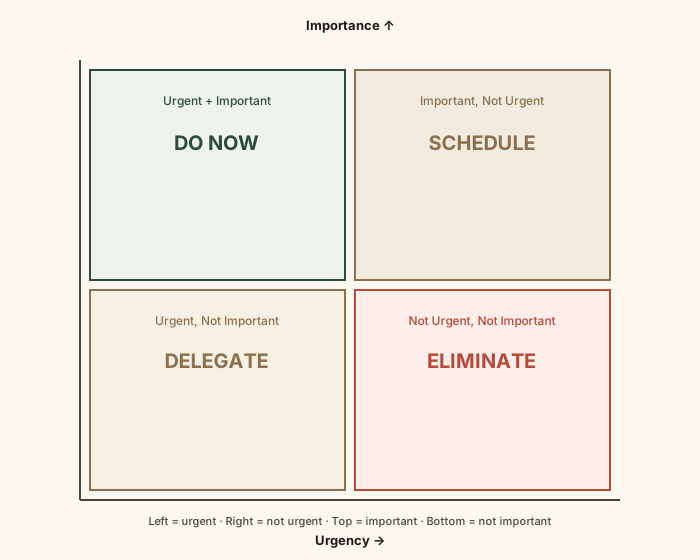
The grid's real function is diagnostic — it makes visible which quadrant a real task list is actually concentrated in, which is often the urgent-but-unimportant one, not the important one.
Common mistakes
Common Mistakes
Treating urgency as a stand-in for importance when sorting tasks.
→ Judge importance by contribution to real goals, independent of how pressing or loud a task feels — the two questions need separate answers.
Never actually eliminating anything, and instead trying to do a little of everything.
→ Give the 'not urgent, not important' quadrant real weight — genuinely eliminating or ignoring those tasks is what frees capacity for the quadrants that matter.
Only reviewing the matrix once and never re-sorting as circumstances change.
→ Re-evaluate regularly — a task's urgency in particular changes constantly, so a one-time sort goes stale fast.
Common misconception
“Anything with a deadline should be treated as a top priority.”
A deadline only establishes urgency, not importance. Plenty of low-value tasks have tight deadlines, and plenty of genuinely high-value work (skill-building, relationship maintenance, strategic planning) has no deadline pressure at all. Prioritizing purely by deadline systematically favors urgent-but-unimportant work over important-but-not-urgent work — which is the exact trap the matrix is built to prevent.
What to do next
What to do next
- Sort your current task list into the four quadrants honestly, resisting the urge to mark everything as urgent and important.
- Look specifically for tasks stuck in 'urgent, not important' and identify what delegating or minimizing them would look like.
- Pick one 'important, not urgent' task and schedule a specific, protected block of time for it this week.
- Read What Time Blocking Actually Is next to see how to turn a sorted priority list into an actual calendar plan.