 KnowThis
Key Takeaways
Key Takeaways
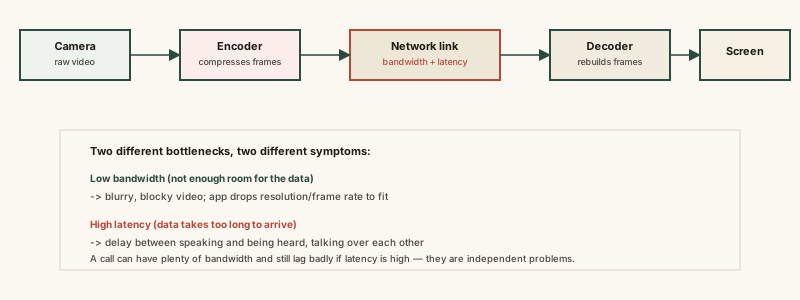
- 1'Lag' actually describes two independent problems — low bandwidth (not enough room for the data) and high latency (data takes too long to arrive) — and they produce different symptoms.
- 2A video call app constantly compresses raw video into a much smaller stream and adjusts quality in real time based on measured network conditions, a feedback loop called adaptive bitrate.
- 3A connection can have plenty of bandwidth and still feel laggy if latency is high — the two are measured independently and a fast download speed doesn't guarantee low latency.
The concept
Once bandwidth and latency are separated as two different measurements, the fix for a bad call stops being a guess — a blurry call and a delayed call point to different problems entirely.
During a video call, the picture is sharp and smooth, but there's a noticeable delay before the other person responds to what you say. What's the more likely bottleneck?
Worked examples
Example 1: A call that gets blurry when someone else starts streaming (baseline case)
A video call turns blurry right when someone else on the same network starts a large download. What is most likely happening?
Example 2: A call between two continents with excellent bandwidth (edge case / variation)
Why can't upgrading to a faster internet plan fix the delay on a very long-distance video call?
Example 3: Diagnosing a laggy call for remote work (real-world / applied case)
Someone on a remote team keeps having video calls that stutter, and they want to know whether to upgrade their internet plan or move closer to their router. The diagnostic approach follows straight from the bandwidth/latency split: if the picture goes blurry or the video freezes intermittently while audio and response timing stay fine, bandwidth is the constraint — a plan upgrade or a wired connection instead of WiFi (which loses some effective bandwidth to signal interference) would help. If instead audio and video are both clear but responses feel delayed and people keep interrupting each other, latency is the constraint — no bandwidth upgrade fixes that, since it's more often caused by network congestion, an overloaded WiFi router, or a naturally longer physical route to the other caller.
Someone's video calls are choppy specifically during video, but audio and timing feel fine, and switching from WiFi to a wired ethernet connection fixes it. What does this suggest was the actual problem?
How it works (visual)
Common mistakes
Common Mistakes
Treating 'lag' as one single problem with one fix.
→ Separate the symptom first — blurry/frozen video points to bandwidth, delayed responses point to latency. They call for different fixes entirely.
Assuming a fast internet plan (high bandwidth) guarantees a smooth call.
→ Bandwidth and latency are independent. A high-bandwidth connection can still have high latency, especially over long physical distances or congested routes.
Thinking video call quality drops because something is broken.
→ Dropping quality mid-call is often adaptive bitrate working correctly — trading resolution for continuity when available bandwidth temporarily shrinks.
Believing more bars of WiFi signal automatically means lower latency.
→ Signal strength affects reliability and effective bandwidth on that local hop, but overall call latency depends on the entire route, including the internet path beyond your router.
Common misconception
“If a video call is laggy, the fix is always to get faster internet.”
A faster internet plan increases bandwidth, which only helps if bandwidth was the actual bottleneck. If the real cause is latency from physical distance, network congestion, or an overloaded router, more bandwidth does nothing — the data still has to travel the same route in the same amount of time. Diagnosing which one is happening (blurry vs. delayed) matters more than defaulting to a plan upgrade.
Try it yourself
A ratio above 1 means your available bandwidth exceeds what the call needs, so quality should stay stable; below 1 means the app will likely have to lower quality or the call may stutter.
Approximates the propagation delay through fiber-optic cable alone (roughly two-thirds the speed of light), there and back — real-world latency is usually somewhat higher due to routing and equipment.
What to do next
What to do next
- Next time a call lags, note whether it's the picture (bandwidth) or the timing (latency) — the fix genuinely differs.
- If video specifically is blurry or freezing, try a wired connection or ask others sharing your network to pause large downloads during the call.
- If audio and video are clear but timing feels delayed, know that a faster internet plan likely won't help — the cause is more often distance, congestion, or router load.
- Read How Push Notifications Work next to see a related but different kind of real-time delivery — brief signals instead of a continuous stream.