 KnowThis
Key Takeaways
Key Takeaways
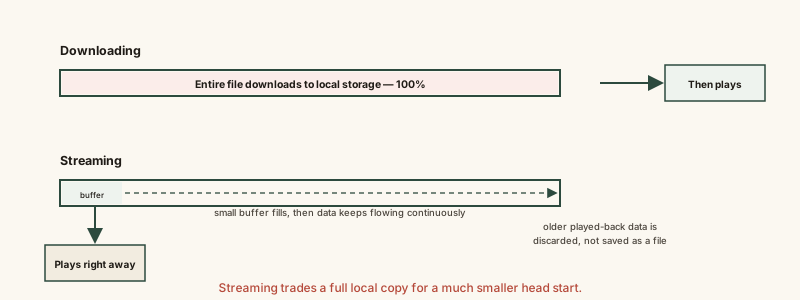
- 1Downloading transfers a complete file to local storage before it can be opened; streaming plays from a small buffer while more data keeps arriving in the background.
- 2Buffering happens specifically because streaming plays close to real time — if incoming data falls behind what playback is consuming, the buffer empties and playback has to pause and wait.
- 3Downloading can't 'buffer' in that sense because nothing plays until the transfer is already complete — its failure mode is a stalled or slow download, not a mid-playback pause.
The concept
Once buffering is understood as a bandwidth-versus-bitrate race rather than a vague glitch, both why it happens and why lowering video quality fixes it stop being mysterious.
A video starts playing immediately after pressing play, but pauses to 'buffer' a minute later. What does this most likely mean?
Worked examples
Example 1: Downloading a song before a flight (baseline case)
A song is fully downloaded to a phone before a flight with no in-flight WiFi. Can this downloaded song buffer during playback mid-flight?
Example 2: Streaming the same song on an unstable connection (edge case / variation)
Why does a brief drop in internet signal cause a streaming song to buffer, but the same drop wouldn't cause a similar interruption for an already-completed download?
Example 3: A streaming service automatically lowering video quality (real-world / applied case)
While watching a show on a home network that's also being used for a large download elsewhere in the house, a streaming service quietly drops the video from high definition to a lower resolution without stopping playback. This is adaptive bitrate streaming in action: the service detects available bandwidth is falling behind the bitrate a higher-quality version requires, and instead of letting the buffer run dry and forcing a pause, it switches to a lower-bitrate version of the same content that fits within the reduced bandwidth. The viewer experiences slightly softer video instead of a stalled video — a deliberate trade-off, not a flaw.
A streaming show automatically switches to a lower resolution while a large download runs elsewhere on the same home network. Is this a malfunction?
How it works (visual)
Common mistakes
Common Mistakes
Assuming streaming saves a full local copy of what you watch or listen to.
→ Streaming typically discards played-back buffer data rather than saving it — a separate explicit 'download for offline' feature, where offered, is what actually saves a full local copy.
Blaming an app or device whenever a stream buffers.
→ Buffering is most often a bandwidth issue relative to the content's bitrate — check network speed and signal strength before assuming the app or device is at fault.
Thinking a fast download speed guarantees smooth streaming.
→ Streaming needs sustained bandwidth roughly at or above the content's bitrate throughout playback, not just a fast one-time speed test result — a connection that dips periodically can still buffer even with a high average speed.
Common misconception
“Streaming and downloading are basically the same thing, just with a different name.”
They use similar underlying network technology, but they're architecturally different processes. Downloading transfers an entire file to local storage before it's usable at all. Streaming plays from a small, continuously refilled buffer while the rest of the content keeps arriving over the network in real time. That structural difference — playing during transfer versus playing only after transfer — is exactly what makes buffering possible for one and not the other.
Try it yourself
A ratio above 1 means your connection can keep the buffer filled faster than playback drains it; below 1 means buffering is likely.
A simplified illustration — real-world streaming also accounts for network variability and adaptive bitrate switching, not just a single average speed.
What to do next
What to do next
- If a stream keeps buffering, check your available bandwidth against the content's typical bitrate rather than assuming the app is broken.
- For content you'll need with no reliable connection (flights, remote areas), use an explicit 'download for offline' option rather than relying on streaming.
- Don't assume streamed content is saved locally — closing the app or losing connection typically means losing access until you reconnect.
- Read Cloud Storage vs. Local Storage next to see the broader access-versus-ownership trade-off that streaming is one specific example of.