 KnowThis
Key Takeaways
Key Takeaways
- 1An ATS doesn't make hiring decisions — it parses a resume into structured data and gives recruiters tools to search, filter, and rank the applicant pool.
- 2Most 'ATS rejections' are actually parsing failures: a resume format the software can't read cleanly into fields, so real qualifications never make it into the searchable record.
- 3Keyword matching mirrors the actual job posting's language, not just the underlying skill — a recruiter searching for a specific term won't surface a resume that uses only a synonym.
The concept
Once parsing and searching are separated from rejecting, the practical advice follows directly: a resume needs to parse cleanly into text and needs to contain the same words a recruiter would actually search for.
What does an applicant tracking system primarily do with an incoming resume?
Worked examples
Example 1: A clean single-column resume parses correctly (baseline case)
A candidate submits a resume with a simple, single-column layout: name and contact info at the top, then clearly labeled sections for experience, education, and skills, each using standard headings. The ATS extracts every field correctly — job titles land in the job-title field, dates land in the date field — so when a recruiter searches for a specific skill or job title, this resume shows up in the results exactly as intended.
Example 2: A two-column, graphics-heavy resume parses incorrectly (edge case / variation)
Why might a well-qualified candidate's resume fail to appear in an ATS keyword search, even though the information is clearly visible on the page?
Example 3: Matching the job posting's exact language (real-world / applied case)
A job posting repeatedly uses the term "project management," but a candidate's resume only says "managed cross-functional initiatives." A recruiter searching the ATS for "project management" won't surface that resume, even though the underlying experience matches closely — the software matches text, not meaning. Adjusting the resume to include the posting's actual phrase, where it's genuinely accurate, puts the candidate back into that search result without changing anything about the real qualifications.
A job posting uses the phrase 'customer relationship management' repeatedly. A resume describes similar work as 'client account handling.' What's the most direct fix?
How it works (visual)
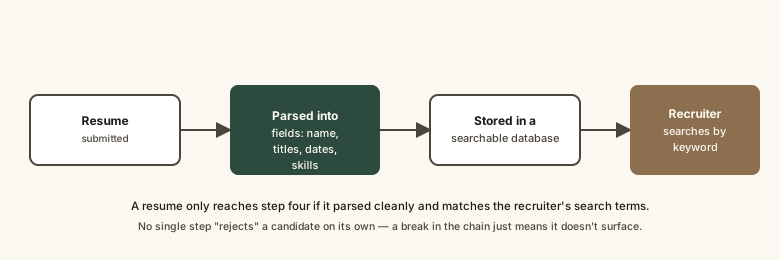
Every step in that chain depends on the previous one working cleanly — a resume that parses badly at step two never has a fair chance at step four, no matter how strong the underlying experience is.
Common mistakes
Common Mistakes
Using tables, text boxes, or multi-column layouts to make a resume look more designed.
→ Stick to a single-column layout with standard section headings — visual complexity is exactly what breaks parsing.
Assuming a low response rate means the ATS is 'rejecting' the candidate.
→ Check whether the resume parses cleanly first (many ATS platforms let candidates preview the parsed version) before assuming it's a qualifications problem.
Stuffing a resume with unrelated keywords to try to match every possible posting.
→ Match the specific posting's real language for skills that are genuinely present — irrelevant keyword stuffing reads badly to the human who eventually reviews the shortlist.
Common misconception
“The ATS automatically rejects most resumes before a human ever sees them.”
In most implementations, the software doesn't make an autonomous reject decision — a recruiter sets search terms or filters, and the ATS returns a ranked or filtered list for a person to review. The practical effect can look like automatic rejection when a resume parses badly or misses the posting's key terms, but the mechanism is a search index missing a match, not a judgment being made by the software itself.
Try it yourself
A simplified way to see how much of a job posting's key terminology a resume currently covers.
What to do next
What to do next
- Save your resume as a standard, single-column layout without tables, text boxes, or columns before submitting it to any online application system.
- Copy the job posting's key skill and role terms and check that your resume genuinely uses the same language, where accurate.
- If a platform offers a 'parsed preview,' check it — confirm your job titles, dates, and skills all landed in the correct fields.
- Read How to Quantify Achievements on a Resume next to strengthen what's actually inside those parsed fields.