 KnowThis
Key Takeaways
Key Takeaways
- 1Nearly every government form follows the same five-part skeleton: identifying information, instructions, fields to complete, a certification/signature section, and submission details.
- 2Reading the instructions before filling in any field prevents the single most common error: entering information in the wrong format or the wrong box, which can trigger a rejection or processing delay.
- 3This is general form literacy, not legal or tax advice for any specific form — for a form tied to a real deadline or legal consequence, the issuing agency's own instructions and help line are the authoritative source.
The concept
The skeleton is consistent enough that the fastest way to tackle any new form is to identify its five parts first, then work through them methodically rather than starting at box one and hoping the rest makes sense as you go.
Why is it usually a mistake to start filling in a government form's fields immediately, before reading the instructions?
Worked examples
Example 1: Parsing a simple renewal form (baseline case)
Example 2: A form with a separate instructions document (edge case / variation)
Example 3: A rejected form due to a formatting mismatch (real-world / applied case)
A government form is rejected as 'incomplete' even though every field appears to be filled in. What is a likely explanation worth checking first?
How it works (visual)
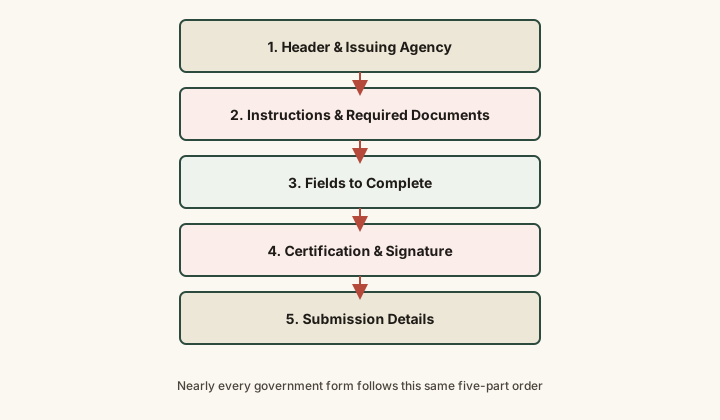
Recognizing which of the five parts a confusing block of text belongs to is usually enough to know how much weight to give it — instructions and required-documents blocks set the rules the fields must follow, while the certification section is a legal statement, not another field to fill in casually.
Common mistakes
Common Mistakes
Filling in fields immediately without reading the instructions document, if one exists separately from the form.
→ Locate and read any separate instructions document first — it often clarifies ambiguous fields and lists required supporting documents the form itself doesn't fully explain.
Signing a certification section without reading what it actually attests to.
→ Read the certification statement in full before signing — it's typically a legal statement (often 'under penalty of perjury') that the information provided is true, not a routine formality.
Assuming a form accepted at one agency or office will be processed identically everywhere.
→ Check the specific submission instructions for the office or portal actually receiving the form — requirements can vary by jurisdiction even for a similarly named form.
Common misconception
“Government forms are all uniquely confusing and have to be learned individually from scratch each time.”
Most government forms — across federal, state, and local agencies — share the same five-part structural skeleton: header/identifying information, instructions and required documents, fields, certification, and submission details. Recognizing this shared structure is a transferable skill: once it's familiar, an unfamiliar form becomes a matter of locating each part rather than learning an entirely new system.
What to do next
What to do next
- Before filling in any field, locate and read the full instructions — whether printed on the form or in a separate document — at least once.
- Make a checklist of every supporting document the instructions require and confirm you have each one before starting the fields.
- Read the certification/signature section in full before signing — know exactly what statement you're attesting to.
- For a form tied to a real deadline, legal consequence, or benefit eligibility, treat the issuing agency's own help line or website as the authoritative source, not a general reference article.